Odoo 17.0 · 17.0.1.0.0
Licence: Other proprietary · Revision: b87e8fef26a2

SMS Inbox & Composer
Choose the correct business number, understand SMS length, attach MMS media or voice, work Inbox threads, clean active chatter without erasing evidence, and keep open records synchronized.
What changes after installation
Practical tools for daily two-way messaging
Sender-number governance
Resolve defaults and validate active state, user access, number limits, gateway policy, and recipient context.
Length feedback
Show characters and estimated SMS segments before the operator sends.
MMS and voice tools
Attach files, drag and drop media, or record audio when the selected gateway supports it.
Operational Inbox
Work normalized phone threads with partner, latest-message, unread, and composer context.
Bulk message selection
Select SMS/MMS rows in chatter and apply a confirmed cleanup operation.
Soft-delete accountability
Remove noise from active chatter while retaining structured metadata for authorized review.
SMS Inbox & Composer · Operator layer
Make two-way SMS practical inside everyday Odoo chatter
Choose the correct business number, compose with SMS/MMS awareness, record voice attachments, select messages in bulk, preserve deleted history and keep open chatter synchronized.
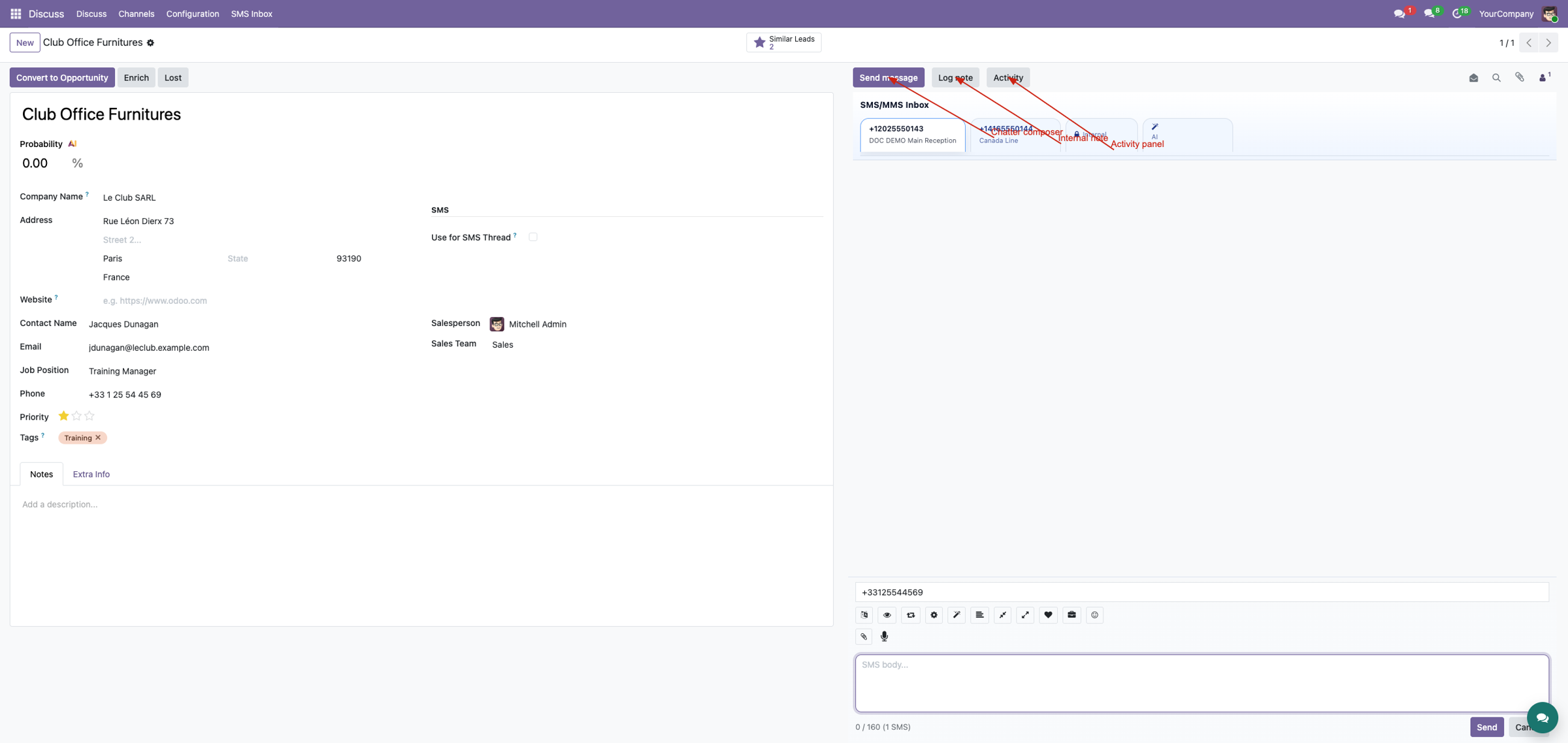
Chatter composer Sender governance Soft-delete archive
From infrastructure to a usable workspace
Gateways and webhooks solve transport. Operators still need a safe way to choose a number, understand message length, attach media, clean a thread without destroying evidence, and see new activity without repeatedly refreshing.
Work in context
Send from the business record instead of moving to technical gateway screens.
Protect the message trail
Soft-delete for operational cleanup while retaining an administrator archive.
Workspace capabilities
Sender selection
User access, active state, defaults and number limits are respected.
SMS feedback
Character and segment counts help operators understand message length.
MMS-aware composer
Attachments, drag/drop and voice recording when the gateway supports media.
Bulk selection
Select SMS/MMS rows directly in chatter and confirm one cleanup action.
Soft delete
Store direction, body, gateway, sender, dates and MMS context for audit.
Live refresh
Bus events update open chatter after messaging and cleanup activity.
Choose the sender identity
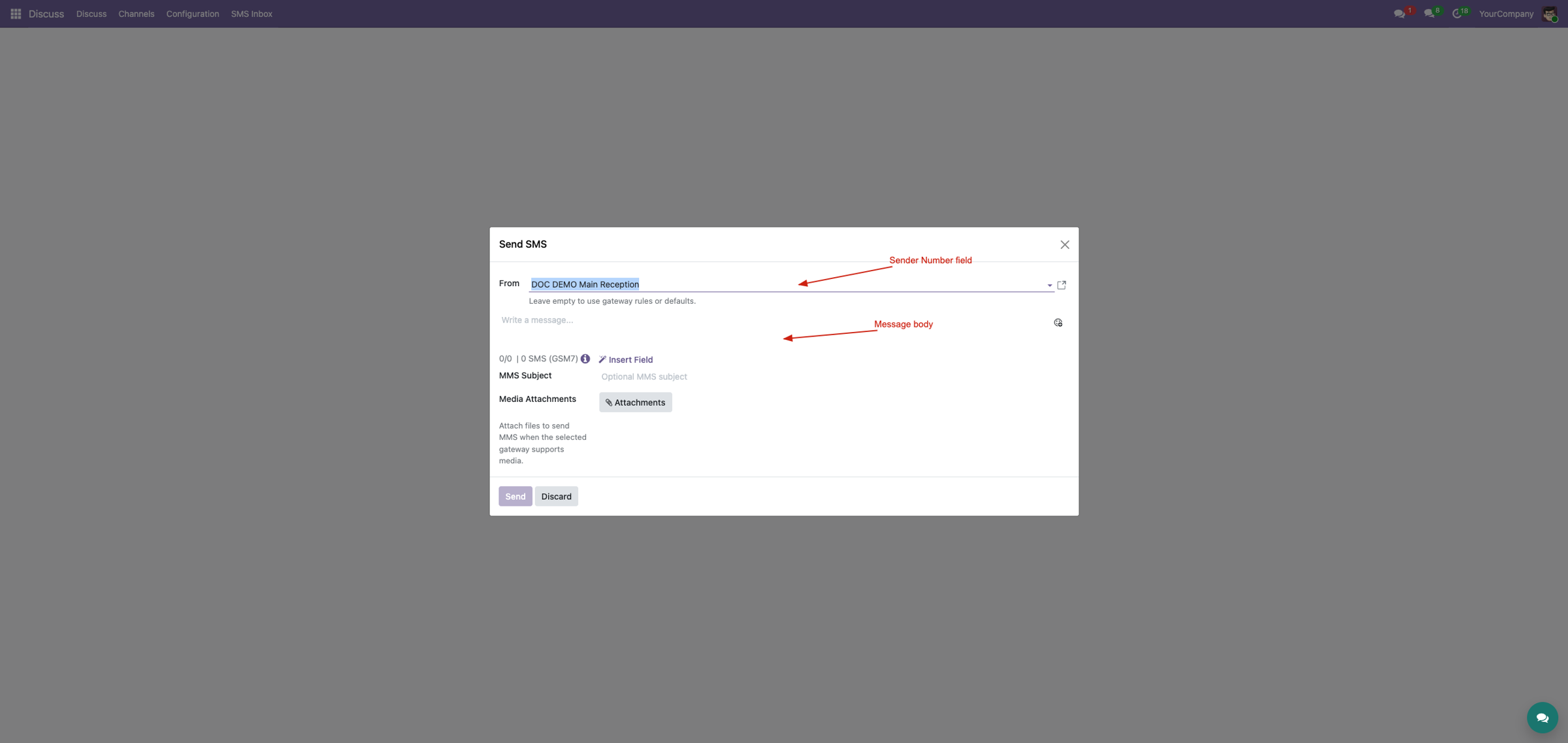
The standard Odoo SMS popup gains a gateway-number selector. Defaults are resolved from user, company, global and gateway policy, while the backend validates that the selected number is active, within limits and allowed for the user.
Compose where the conversation happens
Open the SMS composer separately from email, select a number, review message length, attach files or record audio, and send through the established gateway stack. Unsupported MMS attachments produce a warning instead of a misleading send.
Use SMS Inbox as an operational queue
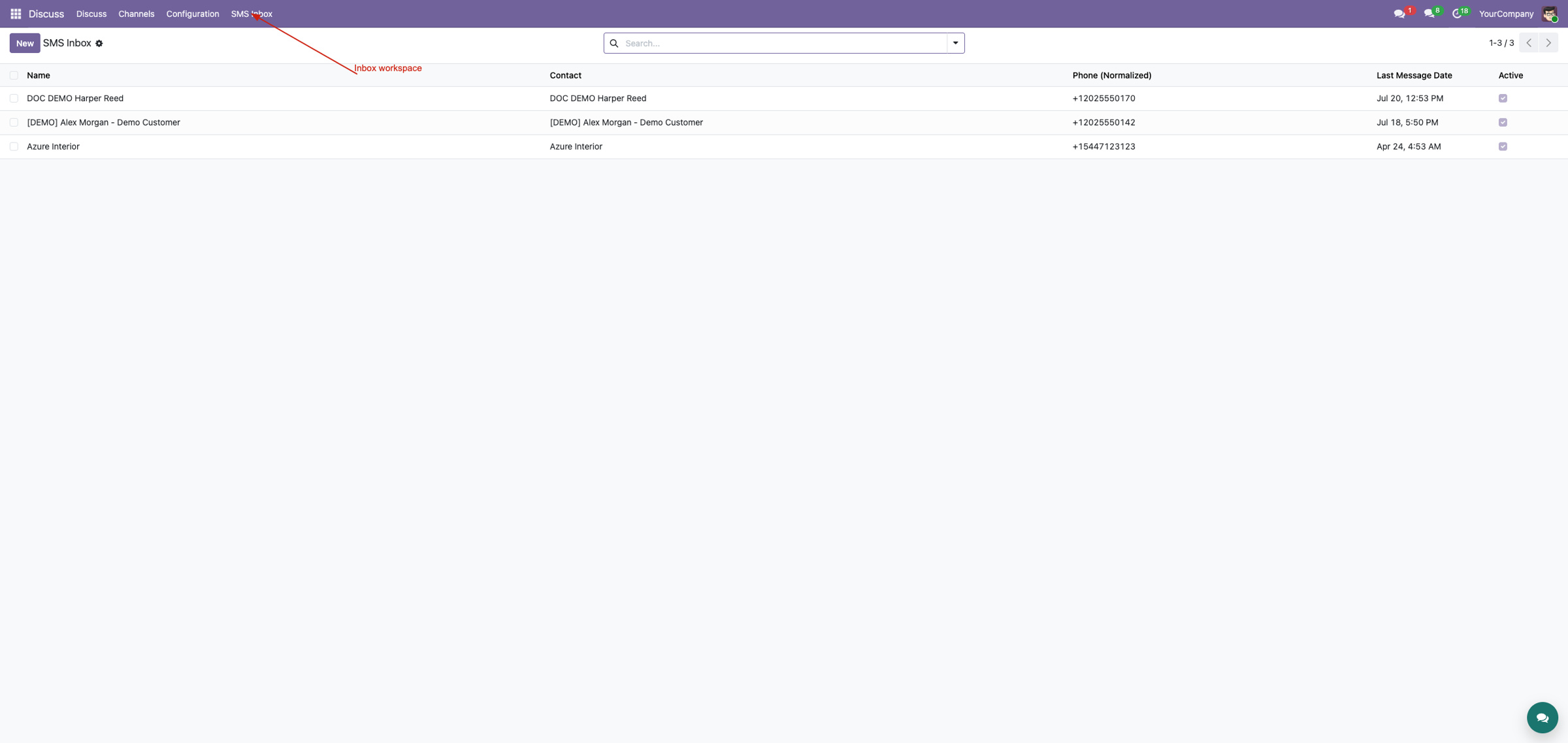
Phone-normalized threads expose partner, latest message and unread context. The workspace links that conversation data with composer controls, while later suite layers add tabs and floating access.
Clean the view without erasing accountability
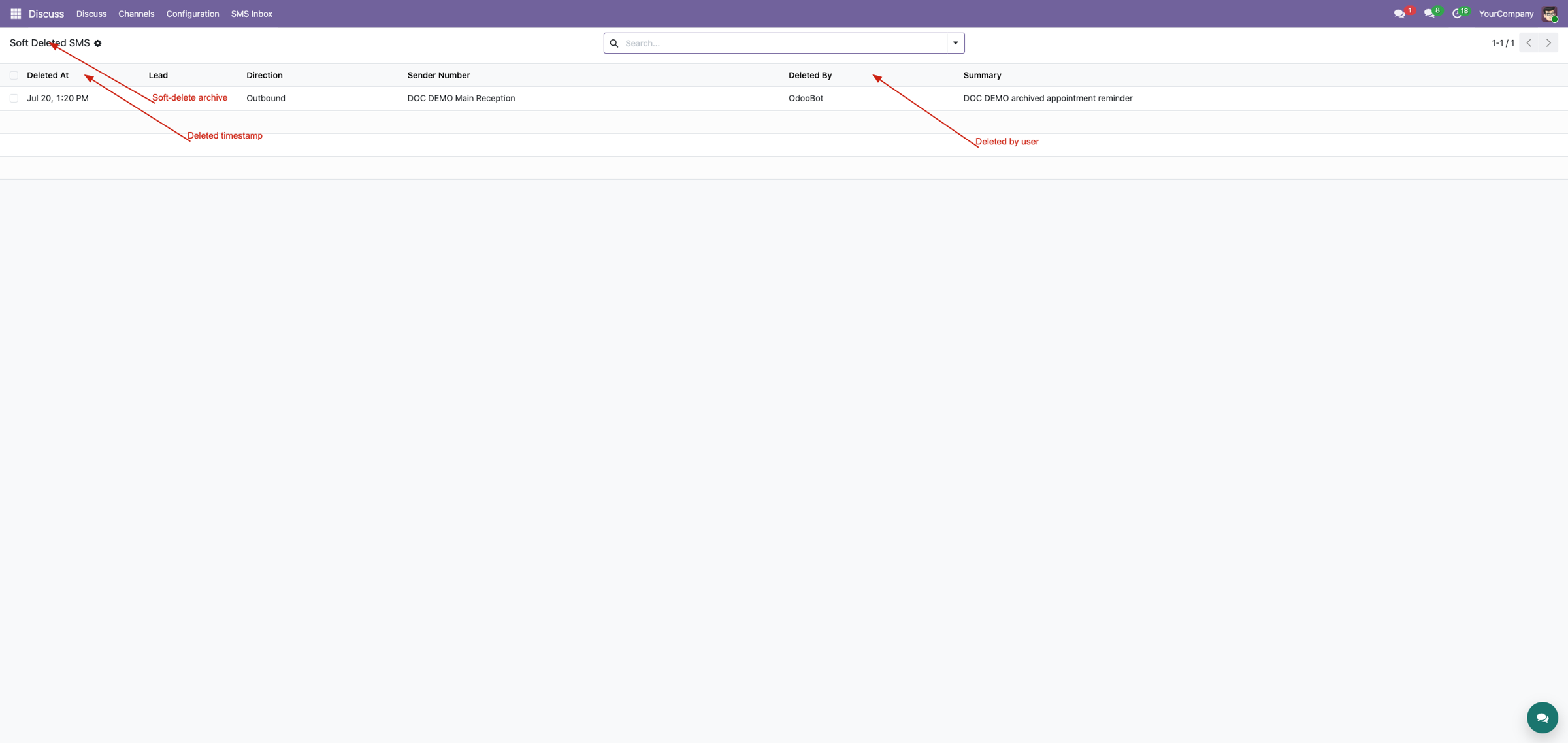
Selection mode adds checkboxes to SMS messages. Soft delete removes selected rows from active chatter, preserves a structured archive, cleans only unshared attachments and refreshes affected threads. Authorized administrators can later perform an irreversible hard delete.
Built-in queue safety
Inbound messages remain state Received and are excluded from outbound queue, send and resend operations. The UI also avoids presenting incoming records as failed outgoing messages.
Continue up the Corvus suite ladder
Workspace is the daily operations layer. Chatter Tabs adds per-number, Internal and AI tabs plus rerouting; Floating Chat adds an always-available panel; SMS & MMS Messaging Suite adds unread systray, sound, desktop/email notifications and transcription.
Explore the complete suiteComplete suite demo
See the workspace in the wider inbound, MMS, tabbed chatter and floating chat workflow.
Watch on YouTubeProfessional Services
Implementation
Install and configure workflows.
Training
Composer and cleanup procedures.
Customization
Odoo, migration and deployment.
Support
Troubleshooting and optimization.
Corvus Nexus Technologies LTD
https://corvusnexus.co.uk support@corvusnexus.co.uk +44 740 4228172
Corvus module ladder
Build the complete Corvus SMS experience
SMS Inbox & Composer provides one focused layer. Choose the complete SMS & MMS Messaging Suite when the deployment also needs configurable gateways, inbound routing, MMS, workspace tools, structured chatter, floating conversations, real-time notifications, translation, enrichment, and campaigns.
MMS Media & Attachments
Add provider-independent MMS requests, secure expiring attachment URLs, composer media, and inbound attachment context to the Corvus two-way messaging stack.
View on Odoo AppsSMS Chatter Conversations
Switch into SMS mode, separate number-specific threads, keep private staff notes beside the customer history, use templates and AI assistance, and safely reroute misplaced inbound messages.
View on Odoo AppsSMS & MMS Messaging Suite
Combine gateway transport, inbound routing, MMS, operator workspaces, structured chatter, floating messaging, real-time notifications, AI tools, and optional translation, enrichment, and campaign workflows.
View on Odoo AppsView the complete suite
Shared suite demonstration
See the complete SMS/MMS workflow
This video demonstrates the broader Corvus suite, not only SMS Inbox & Composer. It helps buyers understand how gateway setup, inbound routing, operator surfaces, messaging enhancements, and follow-up work fit together.
Open on YouTubeVersion and compatibility
Release history
| Version | Compatibility | Status |
|---|---|---|
| 19.0.1.0.0 | Odoo 19.0 | Current documented release |
| Documentation revision | 2026-07-24 | Hero, feature coverage, suite links, video, and FAQ refreshed |
Only verified release information is listed. Technical version semantics remain controlled by the module manifest.
Important questions
Frequently asked questions
How is the default sender number chosen?
The workspace considers user, company, global, and gateway policy, then validates that the final number is active and permitted.
Can an operator attach media to any gateway?
No. Attachments are allowed only when the selected gateway and sender support MMS.
Does soft delete permanently erase SMS history?
No. It removes selected items from active chatter and preserves a structured archive. Hard deletion is a separate authorized action.
How does open chatter stay current?
Workspace services publish and consume Corvus bus events after messaging and cleanup operations.

Implementation, integration, and support
Gateway and webhook configuration · Odoo SMS/MMS implementation · custom provider integration · migration · DevOps · training · troubleshooting · maintenance
corvusnexus.co.uk support@corvusnexus.co.uk
+44 740 4228172
Corvus Nexus Technologies LTD is not an official partner, reseller, or representative of any SMS/MMS provider. Provider accounts, network service, credentials, fees, sender registration, consent, and legal compliance remain the customer's responsibility. Custom gateways may require adjustment.
License and Usage Notice
These modules are provided with absolutely no warranty, commitment, or guarantee.
- Do not use in production until fully validated in test environment.
- Licensed only for one production database unless separate licensing applies.
- We are not responsible for data loss, downtime, outages, integration impact, or business impact.
- Do not redistribute, modify, reuse, or integrate code/concepts commercially without written permission.