Odoo 17.0 · 17.0.1.0.0
Licence: Other proprietary · Revision: b87e8fef26a2

SMS Language Translation
Set user preferences, detect the sender language, translate inbound context and outbound drafts, and keep translation controls inside the Inbox and composer used by the team.
What changes after installation
Language controls where operators need them
User preferences
Choose inbound and outbound translation behavior and a preferred target language per operator.
Thread language state
Keep detected sender language and translation controls with the SMS Inbox conversation.
Forced detection
Re-evaluate the latest inbound text when automatic language state is missing or incorrect.
Composer translation
Translate an outbound draft before the operator reviews and sends it.
Flexible target languages
Request a target language even when it is not part of the normal active business-language workflow.
Optional external processing
Use configured AI/translation services only when the deployment enables them and accepts their data policy.
SMS Language Translation
Translate in the conversation, not in a separate copy-and-paste workflow
Operators can keep their own language preference, inspect the language associated with an SMS Inbox, detect it again from recent inbound text, and translate an outbound draft before sending. The customer conversation remains the working context throughout.
Dependencies and external service
The module depends on SMS Chatter Conversations and Odoo Mail. Translation and language detection require the configured external AI/translation service and valid credentials. No translation result should be treated as automatically approved customer communication.
1. Set the operator's normal language behavior
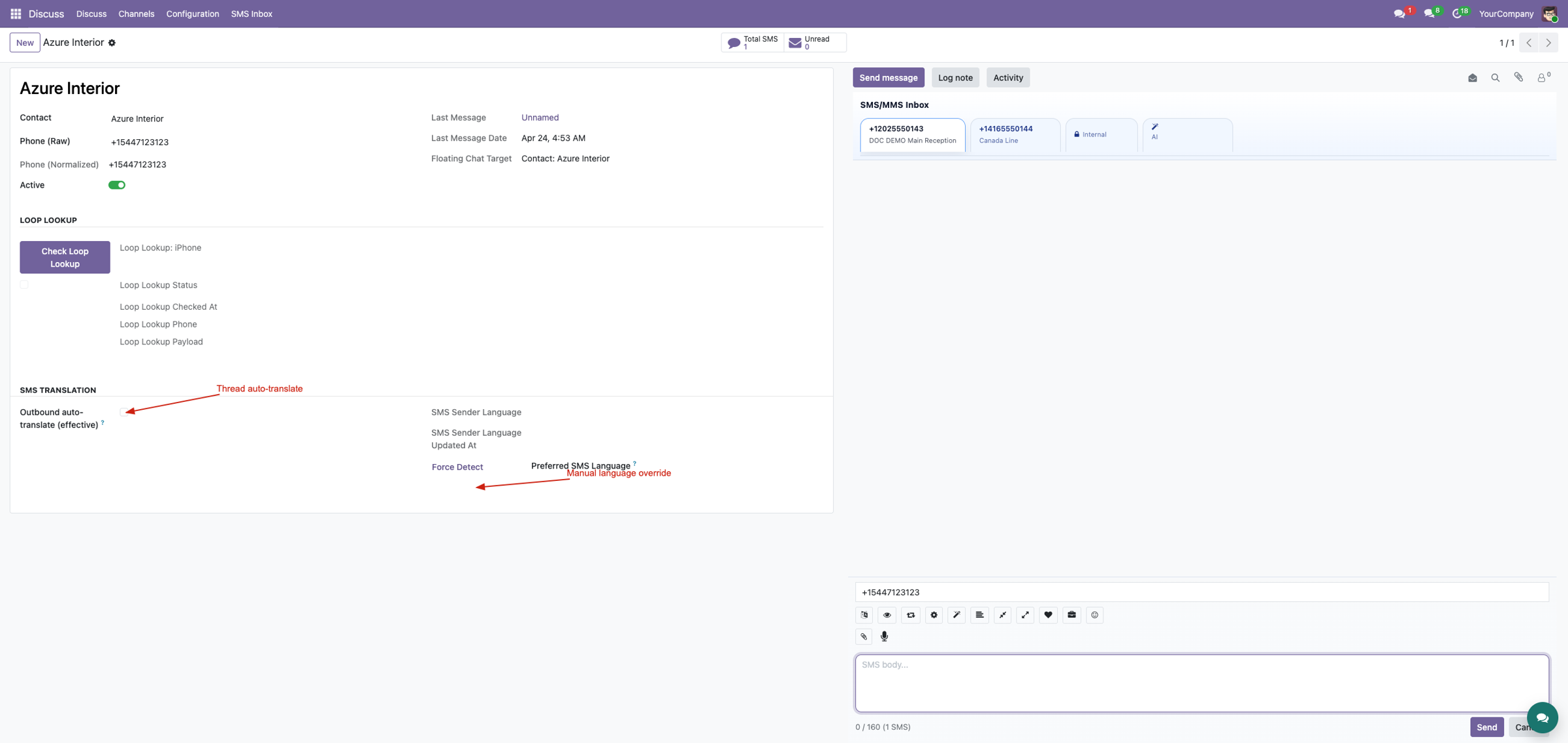
Open the user preferences and choose whether inbound text should be translated for reading, whether outbound drafts should be translated before sending, and which target language the operator normally uses. Preferences are per user, so multilingual teams do not need one global compromise.

2. Review the conversation's language state
The Inbox translation section keeps sender-language and thread-level choices beside the phone conversation. Use a thread override when one customer needs different behavior from the operator's normal preference.
3. Detect the sender language again when needed
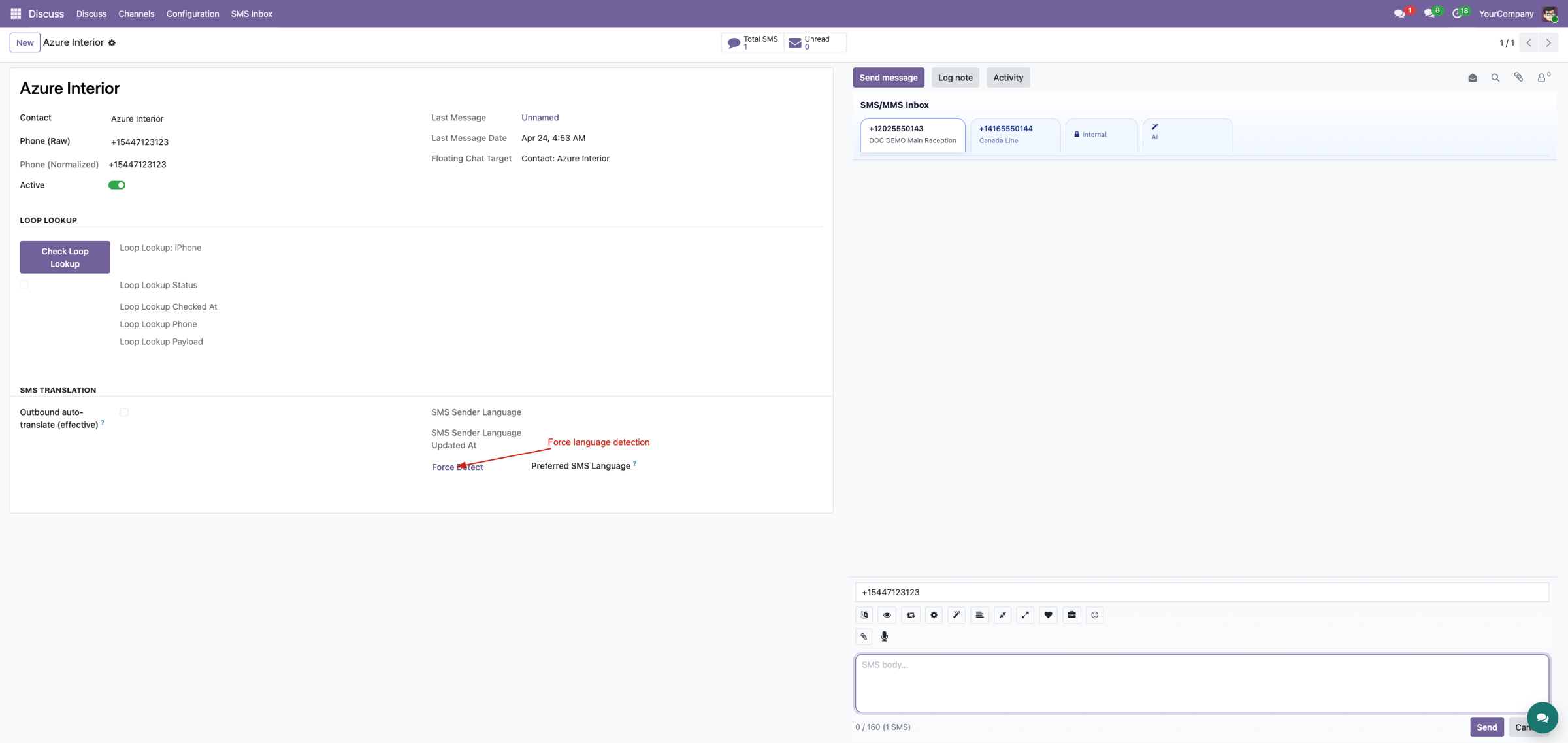
Force Detect Language re-evaluates recent inbound text when the language is missing, stale, or incorrect. Use a meaningful customer message; phone numbers, one-word replies, names, and mixed-language text may not provide enough evidence.
4. Translate, review, then send
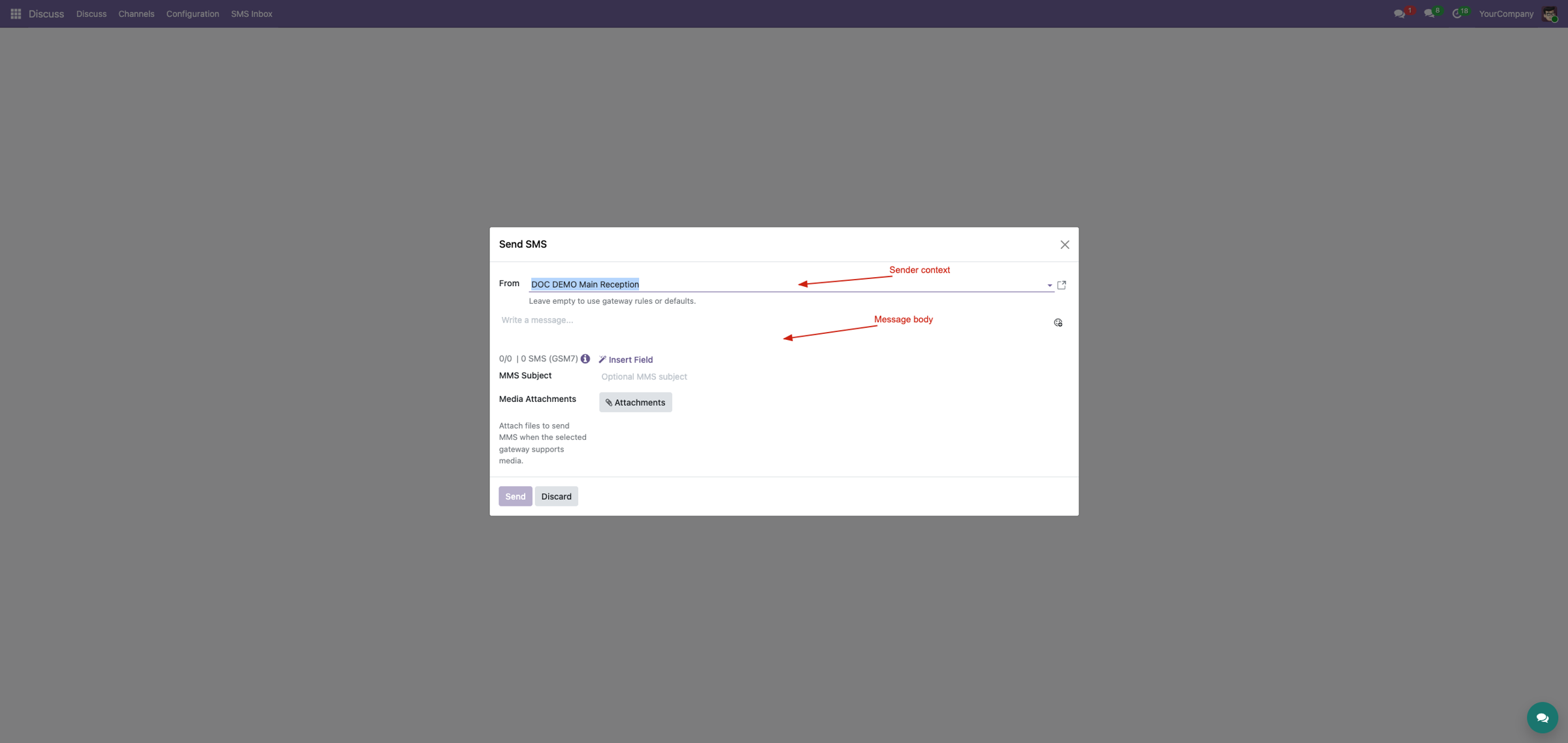
Prepare the outbound draft in the composer and request translation into the selected target language. Review names, numbers, links, industry terms, tone, opt-out wording, and message length before sending. Translation changes the draft; it does not remove the operator's approval step.
5. Keep service configuration controlled
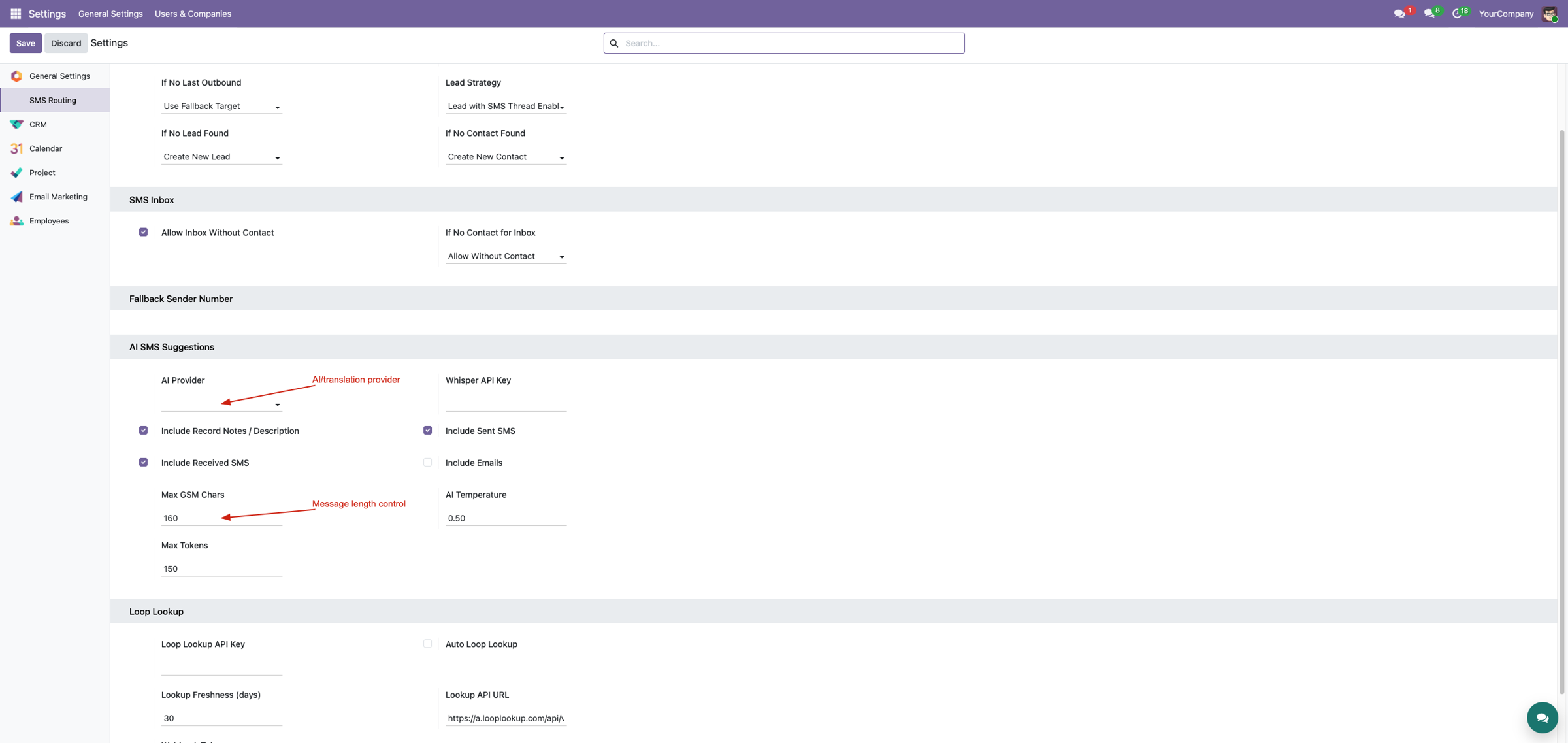
Administrators configure the external provider context and credentials in the appropriate Corvus settings. Protect API keys, understand which message text leaves Odoo, and confirm the provider's retention and privacy terms before enabling the feature for users.
Human review remains essential
Language detection and machine translation can misread short messages, names, addresses, legal statements, cultural tone, and specialist terminology. Operators must review the final text. Customers remain responsible for consent, privacy, external-provider terms, message content, and applicable law.
Corvus module ladder
Build the complete Corvus SMS experience
SMS Language Translation provides one focused layer. Choose the complete Corvus SMS Suite when the deployment also needs configurable gateways, inbound routing, MMS, workspace tools, structured chatter, floating conversations, real-time notifications, translation, enrichment, and campaigns.
SMS Chatter Conversations
Switch into SMS mode, separate number-specific threads, keep private staff notes beside the customer history, use templates and AI assistance, and safely reroute misplaced inbound messages.
View on Odoo AppsFloating SMS Chat
Open a floating panel over the current backend screen, find unread conversations, filter by business number, read SMS/MMS, reply, post private notes, and connect the thread to the right document.
View on Odoo AppsSMS & MMS Messaging Suite
Combine gateway transport, inbound routing, MMS, operator workspaces, structured chatter, floating messaging, real-time notifications, AI tools, and optional translation, enrichment, and campaign workflows.
View on Odoo AppsView the complete suite
Shared suite demonstration
See the complete SMS/MMS workflow
This video demonstrates the broader Corvus suite, not only SMS Language Translation. It helps buyers understand how gateway setup, inbound routing, operator surfaces, messaging enhancements, and follow-up work fit together.
Open on YouTubeVersion and compatibility
Release history
| Version | Compatibility | Status |
|---|---|---|
| 19.0.1.0.0 | Odoo 19.0 | Current documented release |
| Documentation revision | 2026-07-24 | Hero, feature coverage, suite links, video, and FAQ refreshed |
Only verified release information is listed. Technical version semantics remain controlled by the module manifest.
Important questions
Frequently asked questions
Does translation send a message automatically?
No. It prepares or displays translated text; the operator remains responsible for reviewing and sending the final message.
Can the target language be outside Odoo's active languages?
The translation workflow can request another target language, although normal Odoo localization behavior remains separate.
How is sender language detected?
The module can use the latest inbound conversation text and provides a force-detect action when the stored state needs refresh.
Are AI/translation results guaranteed accurate?
No. Names, addresses, legal wording, tone, and industry terminology must be reviewed by a qualified operator.

Implementation, integration, and support
Gateway and webhook configuration · Odoo SMS/MMS implementation · custom provider integration · migration · DevOps · training · troubleshooting · maintenance
corvusnexus.co.uk support@corvusnexus.co.uk
+44 740 4228172
Corvus Nexus Technologies LTD is not an official partner, reseller, or representative of any SMS/MMS provider. Provider accounts, network service, credentials, fees, sender registration, consent, and legal compliance remain the customer's responsibility. Custom gateways may require adjustment.
License and Usage Notice
These modules are provided with absolutely no warranty, commitment, or guarantee.
- Do not use in production until fully validated in test environment.
- Licensed only for one production database unless separate licensing applies.
- We are not responsible for data loss, downtime, outages, integration impact, or business impact.
- Do not redistribute, modify, reuse, or integrate code/concepts commercially without written permission.