Odoo 17.0 · 17.0.1.0.0
Licence: Other proprietary · Revision: b87e8fef26a2

Phone Lookup: LoopLookup
Check the current Inbox phone, cache fresh device results, accept protected asynchronous updates, and expose one canonical lookup state to related Odoo records.
What changes after installation
One current lookup result, owned by the Inbox
Central configuration
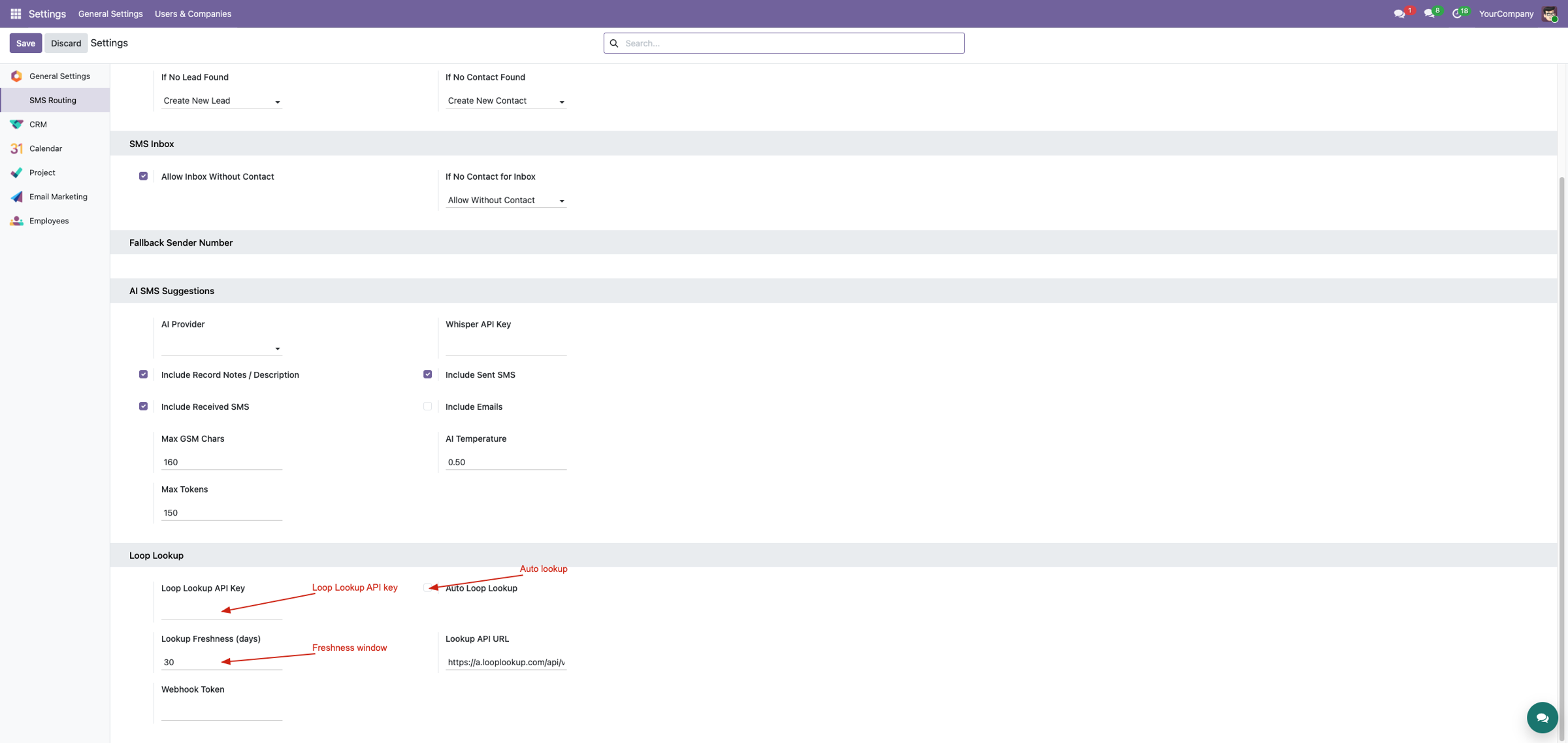
Store API key, base URL, freshness policy, automatic mode, and webhook token in settings.
Manual verification
Run a forced lookup from the dedicated Inbox page when an administrator needs a current result.
Freshness-aware reuse
Reuse a valid cached result and refresh only when missing, changed, stale, or explicitly forced.
Asynchronous callback
Accept provider results through a token-protected webhook endpoint.
Canonical Inbox state
Store checked phone, status, time, inferred iPhone state, and provider payload together.
Shared business context
Resolve related leads, orders, contacts, and other supported records to the same Inbox result.
Corvus SMS Loop Lookup · Optional intelligence layer
Keep destination-device intelligence beside the real SMS conversation
Check LoopLookup from Odoo, cache fresh results, accept protected asynchronous updates and store iPhone/device status on the canonical SMS Inbox thread.
Device insight Freshness cache Webhook updates
External intelligence becomes useful when it has an owner
A lookup response is easy to lose if it exists only in a transient popup. This bridge makes SMS Inbox the long-term owner of the checked phone, status, timestamp, inferred iPhone state and provider payload.
Conversation-owned state
One lookup result follows the inbox instead of being copied to many documents.
Cost-aware refresh
Reuse fresh data; call the provider when missing, changed, stale or forced.
Three ways to keep data current
Manual check
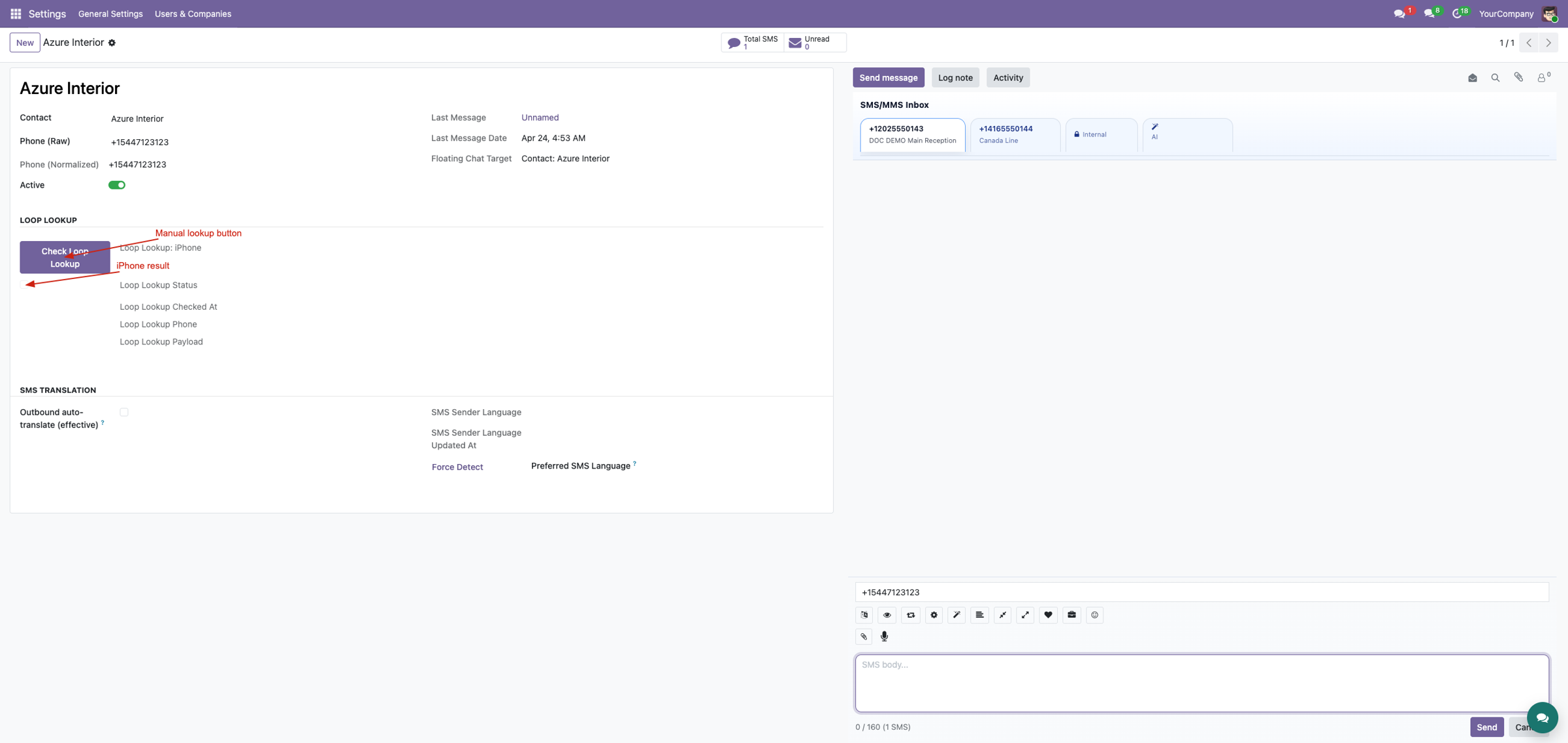
An administrator can force a fresh result from the inbox form.
Automatic check
Authenticated suite calls reuse or refresh according to configured freshness.
Webhook update
LoopLookup can send asynchronous results through a token-protected endpoint.
Configure the service centrally
Store API key, automatic-lookup switch, freshness days, provider base URL and webhook token in SMS Routing settings. Credentials remain out of business records and screenshots.
Check the conversation's current phone
The module chooses normalized inbox phone, raw inbox phone, contact mobile, then contact phone. A manual check forces a provider call and records the status, checked time and exact phone used.
Retain evidence for diagnostics
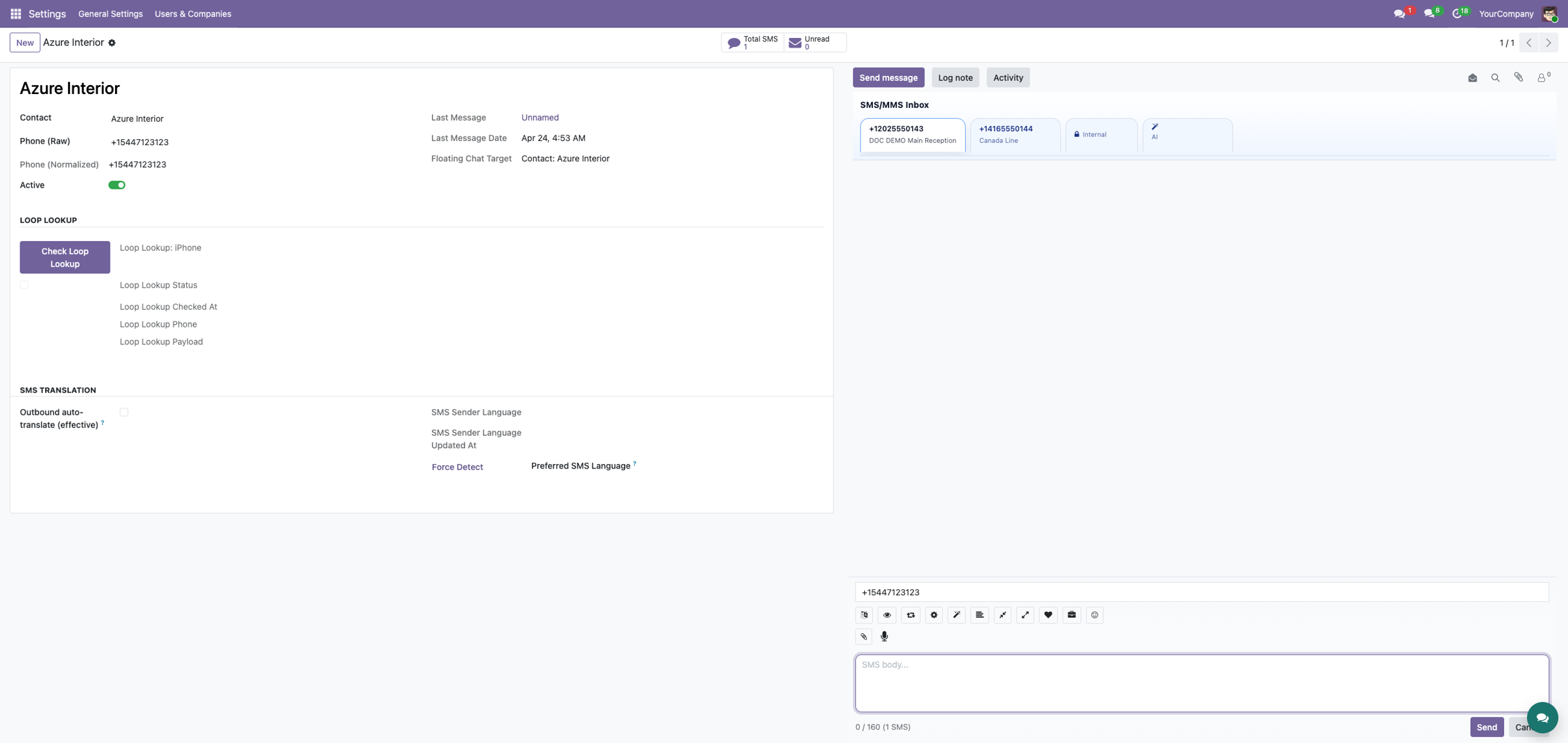
The inbox stores inferred iPhone state and concise status alongside the provider payload. Other suite surfaces can resolve an inbox from a business record and consume the same canonical result.
One result for every related business screen
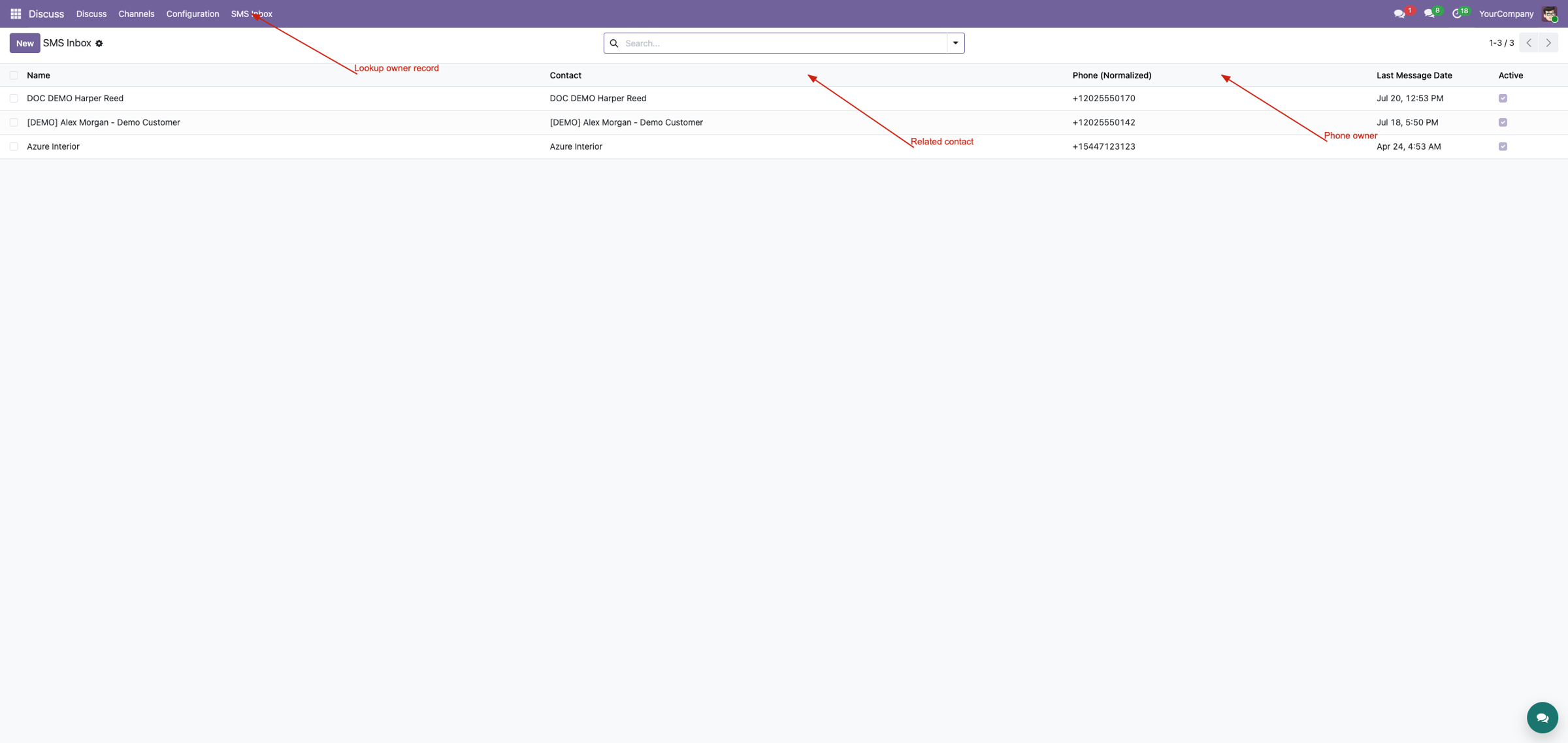
Calls starting from a partner-related record resolve the same SMS Inbox. This avoids stale copies across leads, orders and contacts while keeping device status beside the real conversation.
Flexible callback normalization
The webhook understands several payload locations and protocol-prefixed numbers such as SMS, iMessage, telephone and FaceTime forms. It can infer iPhone state from Apple-service availability, device/platform labels or explicit booleans, then update or create the matching inbox.
External-service boundary
LoopLookup credentials, fees, accuracy and availability are external. A positive result is intelligence, not a guarantee of delivery, device ownership or current state. Protect the public webhook with a strong token and HTTPS.
An optional enhancement to the SMS & MMS Messaging Suite
Loop Lookup enriches SMS Inbox; it does not replace gateways, inbound routing, MMS, chatter or floating chat. Combine it with the full suite when operators need device context beside a complete two-way conversation workflow.
Explore the complete suiteComplete suite demo
The video demonstrates the broader Corvus SMS/MMS suite.
Watch on YouTubeProfessional Services
Implementation
Webhook setup
Integration
Training & support
Corvus Nexus Technologies LTD
https://corvusnexus.co.uk support@corvusnexus.co.uk +44 740 4228172
Corvus module ladder
Build the complete Corvus SMS experience
Corvus SMS Loop Lookup provides one focused layer. Choose the complete SMS & MMS Messaging Suite when the deployment also needs configurable gateways, inbound routing, MMS, workspace tools, structured chatter, floating conversations, real-time notifications, translation, enrichment, and campaigns.
Two-Way SMS & CRM Inbox
Map provider payloads, validate webhooks, register multiple receiving numbers, route replies to CRM or contacts, preserve unmatched conversations, and diagnose every callback from one inbound foundation.
View on Odoo AppsFloating SMS Chat
Open a floating panel over the current backend screen, find unread conversations, filter by business number, read SMS/MMS, reply, post private notes, and connect the thread to the right document.
View on Odoo AppsSMS & MMS Messaging Suite
Combine gateway transport, inbound routing, MMS, operator workspaces, structured chatter, floating messaging, real-time notifications, AI tools, and optional translation, enrichment, and campaign workflows.
View on Odoo AppsView the complete suite
Shared suite demonstration
See the complete SMS/MMS workflow
This video demonstrates the broader Corvus suite, not only Corvus SMS Loop Lookup. It helps buyers understand how gateway setup, inbound routing, operator surfaces, messaging enhancements, and follow-up work fit together.
Open on YouTubeVersion and compatibility
Release history
| Version | Compatibility | Status |
|---|---|---|
| 19.0.1.0.0 | Odoo 19.0 | Current documented release |
| Documentation revision | 2026-07-24 | Hero, feature coverage, suite links, video, and FAQ refreshed |
Only verified release information is listed. Technical version semantics remain controlled by the module manifest.
Important questions
Frequently asked questions
Does this module include a Loop Lookup subscription?
No. A separate provider account, API key, service availability, and provider terms are required.
Why is the result stored on SMS Inbox?
The Inbox is the canonical phone conversation, so related business documents can reuse one current result instead of stale copies.
When is the provider called?
According to the freshness policy: when data is missing, the phone changed, the cache expired, or an administrator forces a check.
Is the webhook public?
The route is externally reachable for the provider but protected by the configured token.

Implementation, integration, and support
Gateway and webhook configuration · Odoo SMS/MMS implementation · custom provider integration · migration · DevOps · training · troubleshooting · maintenance
corvusnexus.co.uk support@corvusnexus.co.uk
+44 740 4228172
Corvus Nexus Technologies LTD is not an official partner, reseller, or representative of any SMS/MMS provider. Provider accounts, network service, credentials, fees, sender registration, consent, and legal compliance remain the customer's responsibility. Custom gateways may require adjustment.
License and Usage Notice
These modules are provided with absolutely no warranty, commitment, or guarantee.
- Do not use in production until fully validated in test environment.
- Licensed only for one production database unless separate licensing applies.
- We are not responsible for data loss, downtime, outages, integration impact, or business impact.
- Do not redistribute, modify, reuse, or integrate code/concepts commercially without written permission.