Odoo 17.0 · 17.0.1.0.0
Licence: Other proprietary · Revision: b87e8fef26a2

Floating SMS Chat
Open a floating panel over the current backend screen, find unread conversations, filter by business number, read SMS/MMS, reply, post private notes, and connect the thread to the right document.
What changes after installation
A complete panel workflow over the current screen
Persistent launcher
Open the messaging panel from the backend without abandoning the current record.
Conversation discovery
Search by contact or phone, show unread only, and sort useful queue data.
Number and context tabs
Focus the thread by gateway number, Internal notes, or AI context.
Rich thread and composer
Review SMS/MMS direction and attachments, then write, attach, drag, drop, or record voice.
Document routing
Associate the inbox with a same-customer business document and preserve that context.
Real-time refresh
Update the list, unread state, and open thread when Corvus bus events arrive.
Floating SMS Chat · Fast-access inbox
Handle SMS conversations without leaving the Odoo screen you are working on
Open a floating inbox, filter unread work, select a business-number tab, read SMS/MMS, reply, post private notes, review AI history and connect the thread to the right customer document.
Docked panel Search + unread filters Document routing
Conversation work should not interrupt every other task
Opening each inbox form costs attention. Floating Chat keeps customer SMS work one click away while the operator reviews a lead, order, invoice, task or any other Odoo screen.
Faster response
Search, filter, read and reply from one panel.
Business context
Route the inbox to a same-customer document and mirror future inbound activity.
A complete panel workflow
Inbox discovery
Search name/phone, show unread only, and sort by recency, name or number.
Structured tabs
Filter by gateway number and switch to Internal or AI context.
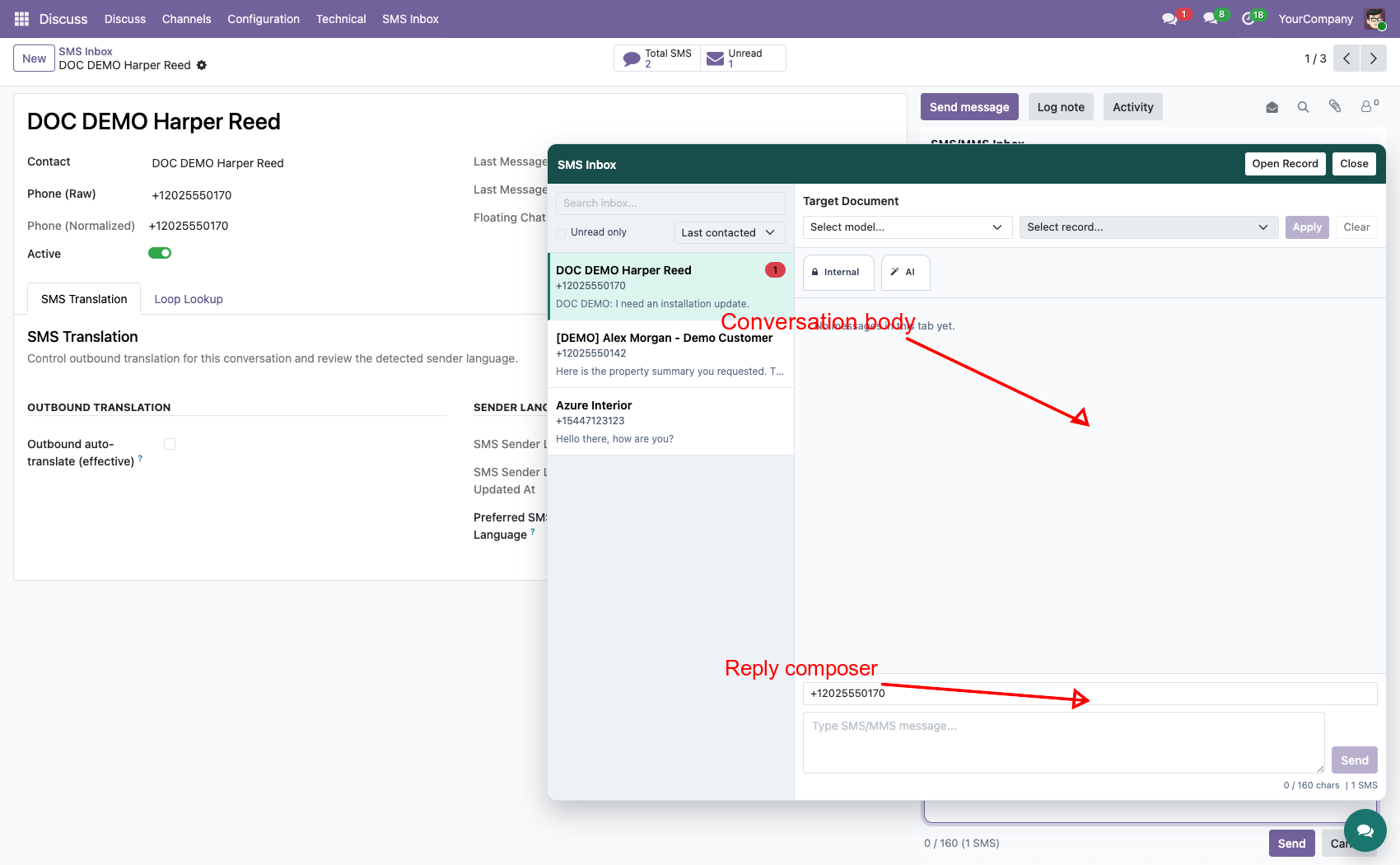
Rich thread
Direction, SMS/MMS type, number labels and attachment previews.
Full composer
Text, attachments, drag/drop, voice recorder and segment counting.
Target routing
Same-partner leads, orders, invoices, projects, tasks and more.
Live updates
Bus events refresh inbox lists, unread counts and the selected thread.
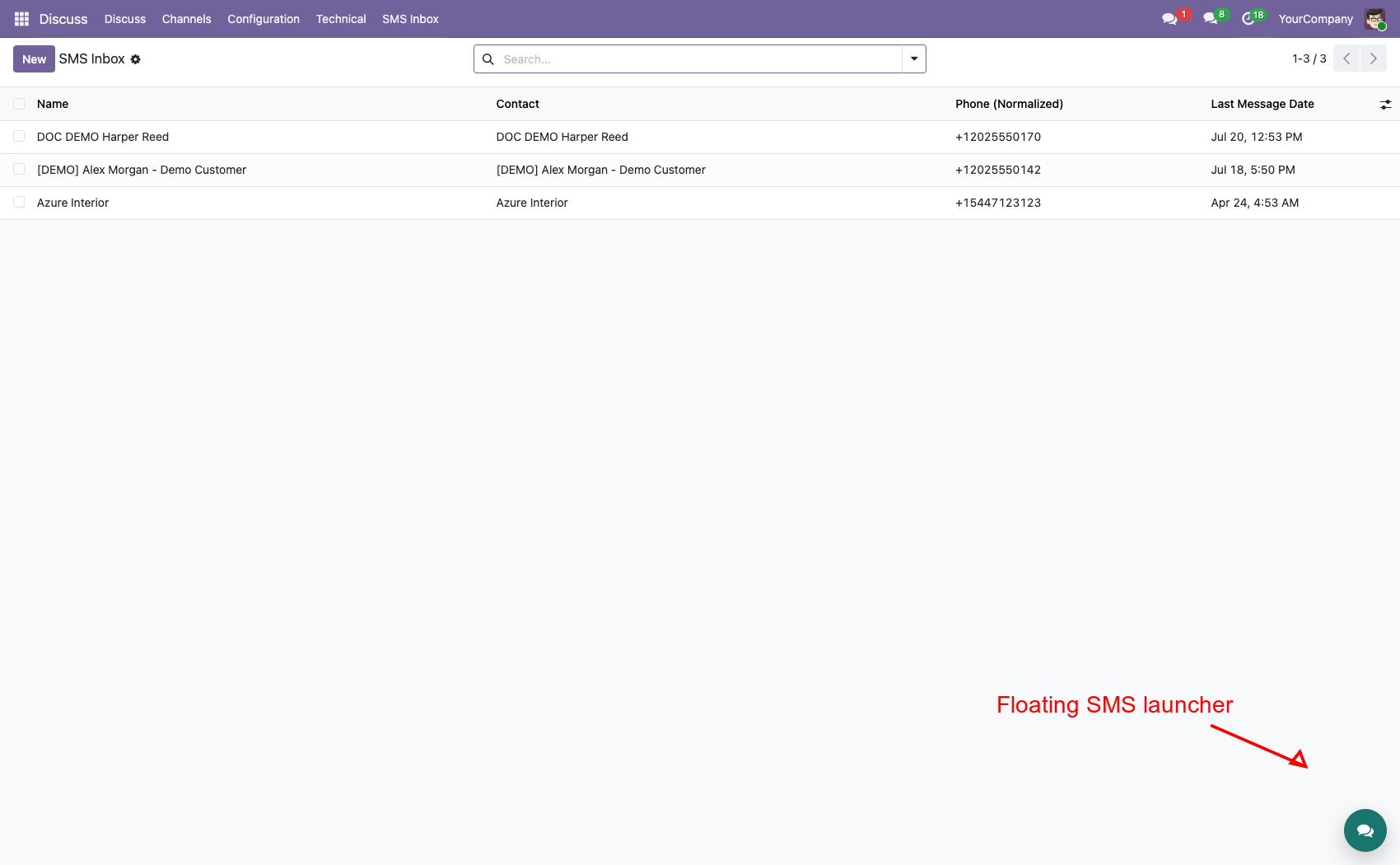
One launcher, available across the backend
The bottom-right icon opens the panel over the current Odoo screen. It uses the available browser space and does not force documentation into an artificially narrow page.
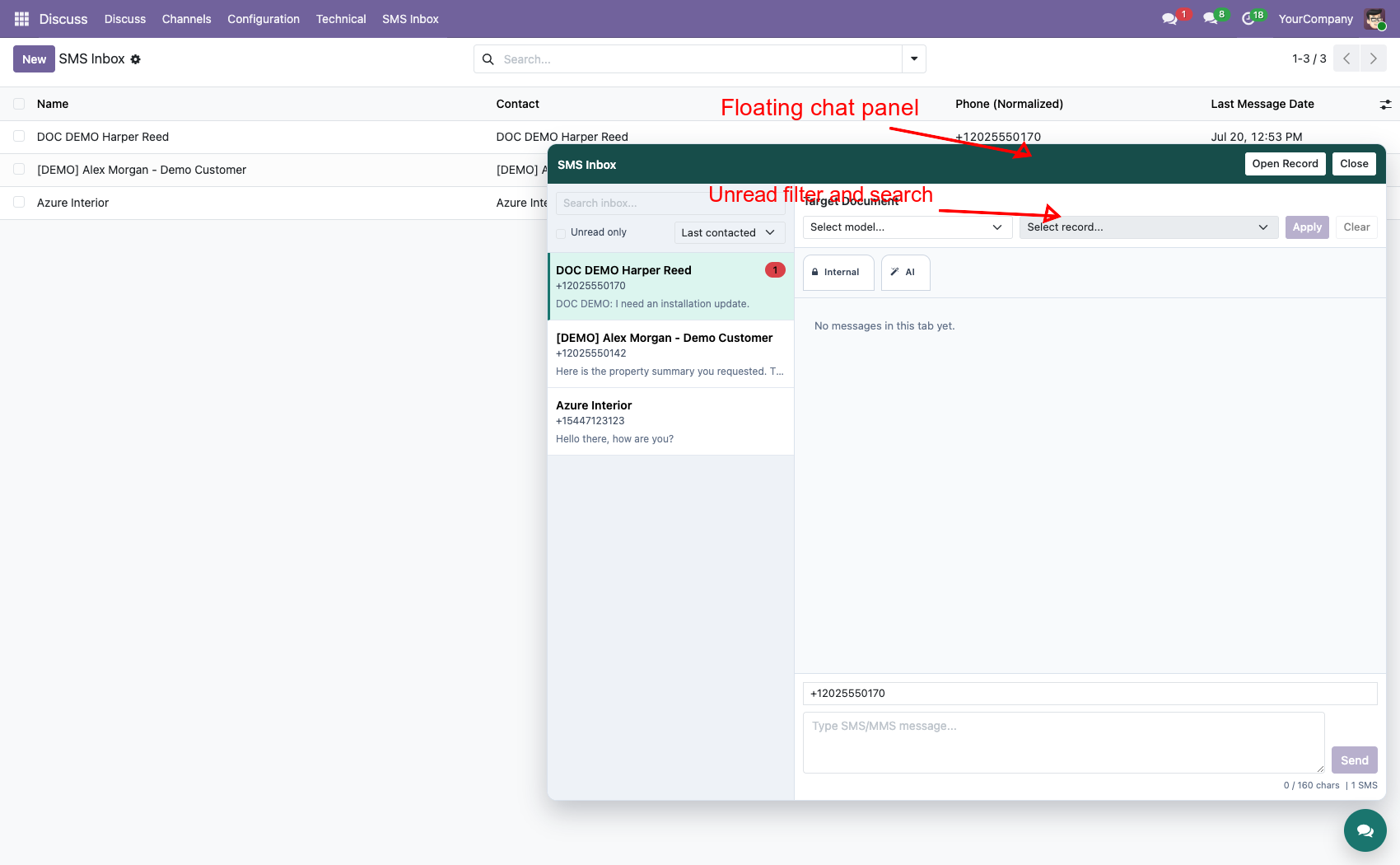
Bring unread work to the surface
The sidebar returns contact/phone, unread count, recent date, preview and current route target. Search and filters make the panel useful with a real conversation queue, not only a single thread.
Read, route and reply in one place
Thread rows separate inbound, outbound and Internal messages and show number identity plus SMS/MMS type. Choose a number tab, write text, add supported media or voice, watch segment count and send through the normal composer service.
Route once, keep both views useful
Select a target model and same-customer record. Outbound sends use that document as context, while new inbound messages remain in SMS Inbox and can also be mirrored to the selected chatter. Clear the target whenever that relationship is no longer correct.
Complete the experience with SMS & MMS Messaging Suite
Floating Chat depends on the full conversation ladder below it. The top suite module adds systray unread alerts, browser/sound/email notifications, popup AI actions and Whisper audio transcription. Optional Translation and Loop Lookup enrich the same inbox context.
Explore the complete suiteComplete suite demo
See the launcher and panel in the wider two-way messaging workflow.
Watch on YouTubeRequirements and limits
SMS Inbox, gateway numbers, workspace and Chatter Tabs must be installed. Target choices depend on installed Odoo applications, read rights and matching customer context. AI uses external providers; MMS depends on gateway capability; live refresh depends on browser bus connectivity.
Professional Services
Implementation
Routing design
Customization
Training & support
Corvus Nexus Technologies LTD
https://corvusnexus.co.uk support@corvusnexus.co.uk +44 740 4228172
Corvus module ladder
Build the complete Corvus SMS experience
Floating SMS Chat provides one focused layer. Choose the complete Corvus SMS Suite when the deployment also needs configurable gateways, inbound routing, MMS, workspace tools, structured chatter, floating conversations, real-time notifications, translation, enrichment, and campaigns.
SMS Chatter Conversations
Switch into SMS mode, separate number-specific threads, keep private staff notes beside the customer history, use templates and AI assistance, and safely reroute misplaced inbound messages.
View on Odoo AppsSMS Language Translation
Set user preferences, detect the sender language, translate inbound context and outbound drafts, and keep translation controls inside the Inbox and composer used by the team.
View on Odoo AppsSMS & MMS Messaging Suite
Combine gateway transport, inbound routing, MMS, operator workspaces, structured chatter, floating messaging, real-time notifications, AI tools, and optional translation, enrichment, and campaign workflows.
View on Odoo AppsView the complete suite
Shared suite demonstration
See the complete SMS/MMS workflow
This video demonstrates the broader Corvus suite, not only Floating SMS Chat. It helps buyers understand how gateway setup, inbound routing, operator surfaces, messaging enhancements, and follow-up work fit together.
Open on YouTubeVersion and compatibility
Release history
| Version | Compatibility | Status |
|---|---|---|
| 19.0.1.0.0 | Odoo 19.0 | Current documented release |
| Documentation revision | 2026-07-24 | Hero, feature coverage, suite links, video, and FAQ refreshed |
Only verified release information is listed. Technical version semantics remain controlled by the module manifest.
Important questions
Frequently asked questions
Does Floating Chat replace the full SMS Inbox?
No. It is a fast-access operator surface over the same conversation data; the full Inbox remains available.
Can I keep working on the current Odoo screen?
Yes. The panel opens over the backend and uses the available browser space.
Which messages can the panel display?
It can show inbound/outbound SMS, MMS context and attachments, plus private Internal messages where companion modules provide them.
How are new replies synchronized?
The panel listens to the Corvus real-time bus and refreshes relevant inbox and thread state.

Implementation, integration, and support
Gateway and webhook configuration · Odoo SMS/MMS implementation · custom provider integration · migration · DevOps · training · troubleshooting · maintenance
corvusnexus.co.uk support@corvusnexus.co.uk
+44 740 4228172
Corvus Nexus Technologies LTD is not an official partner, reseller, or representative of any SMS/MMS provider. Provider accounts, network service, credentials, fees, sender registration, consent, and legal compliance remain the customer's responsibility. Custom gateways may require adjustment.
License and Usage Notice
These modules are provided with absolutely no warranty, commitment, or guarantee.
- Do not use in production until fully validated in test environment.
- Licensed only for one production database unless separate licensing applies.
- We are not responsible for data loss, downtime, outages, integration impact, or business impact.
- Do not redistribute, modify, reuse, or integrate code/concepts commercially without written permission.