Odoo 17.0 · 17.0.1.0.0
Licence: Other proprietary · Revision: b87e8fef26a2

SMS Chatter Conversations
Switch into SMS mode, separate number-specific threads, keep private staff notes beside the customer history, use templates and AI assistance, and safely reroute misplaced inbound messages.
What changes after installation
A conversation workspace built around identity
SMS mode switch
Move between focused SMS work and normal Odoo chatter with a clear Back to Chatter action.
Number-specific tabs
Keep sender identities separate and order active conversations by recent activity.
Internal workspace
Record staff-only notes and follower mentions away from customer-facing SMS.
SMS and spintax templates
Insert reusable approved wording and controlled variants into the composer.
AI reply tools
Suggest, summarize, shorten, expand, soften, formalize, or make a draft friendlier.
Summary history and rerouting
Retain AI artifacts and move a misplaced inbound message to a valid same-customer document.
SMS Chatter Conversations · Conversation layer
Give every business number its own conversation inside Odoo chatter
Switch from normal chatter to a focused SMS/MMS inbox with per-number tabs, private staff notes, AI summaries and reply tools, plus safe rerouting for misplaced inbound messages.
Per-number tabs Internal workspace AI assistance
One generic chatter stream becomes hard to operate
When a customer communicates through several business numbers, ordinary chatter mixes identities. Internal notes compete with customer messages, long histories are expensive to review, and a reply routed to the wrong document is difficult to correct.
Conversation structure
Number tabs follow accessible sender identities and recent activity.
Faster understanding
Stored AI summaries, next steps and reply choices reduce review time.
More than tabs
Chatter mode switch
Enter SMS mode and use Back to Chatter whenever normal Odoo activity is needed.
Recency ordering
Active number conversations move forward based on thread or partner history.
Private Internal tab
Staff notes and relevant follower mentions stay separate from outbound SMS.
AI toolbar
Suggest, summarize, shorten, lengthen, soften, formalize or make a draft friendly.
Summary history
Store main, all-number and per-number summaries, next steps and reply alternatives.
Safe rerouting
Move an inbound chatter message to another same-customer document.
Switch into focused SMS mode
The module adds a clear toggle without replacing normal chatter. Supported records with customer context can show the SMS inbox; Back to Chatter returns to Odoo's standard messages, notes and activities.
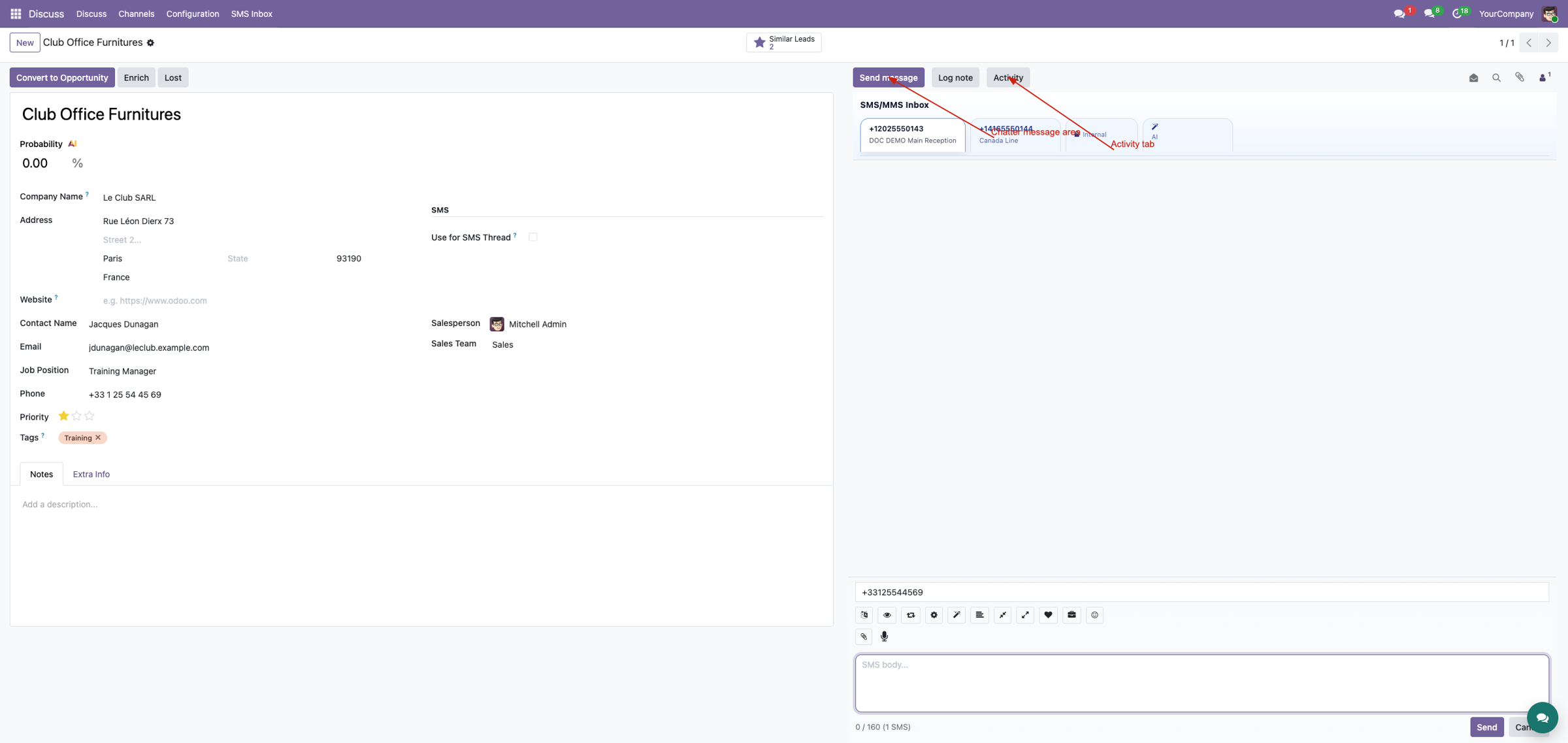
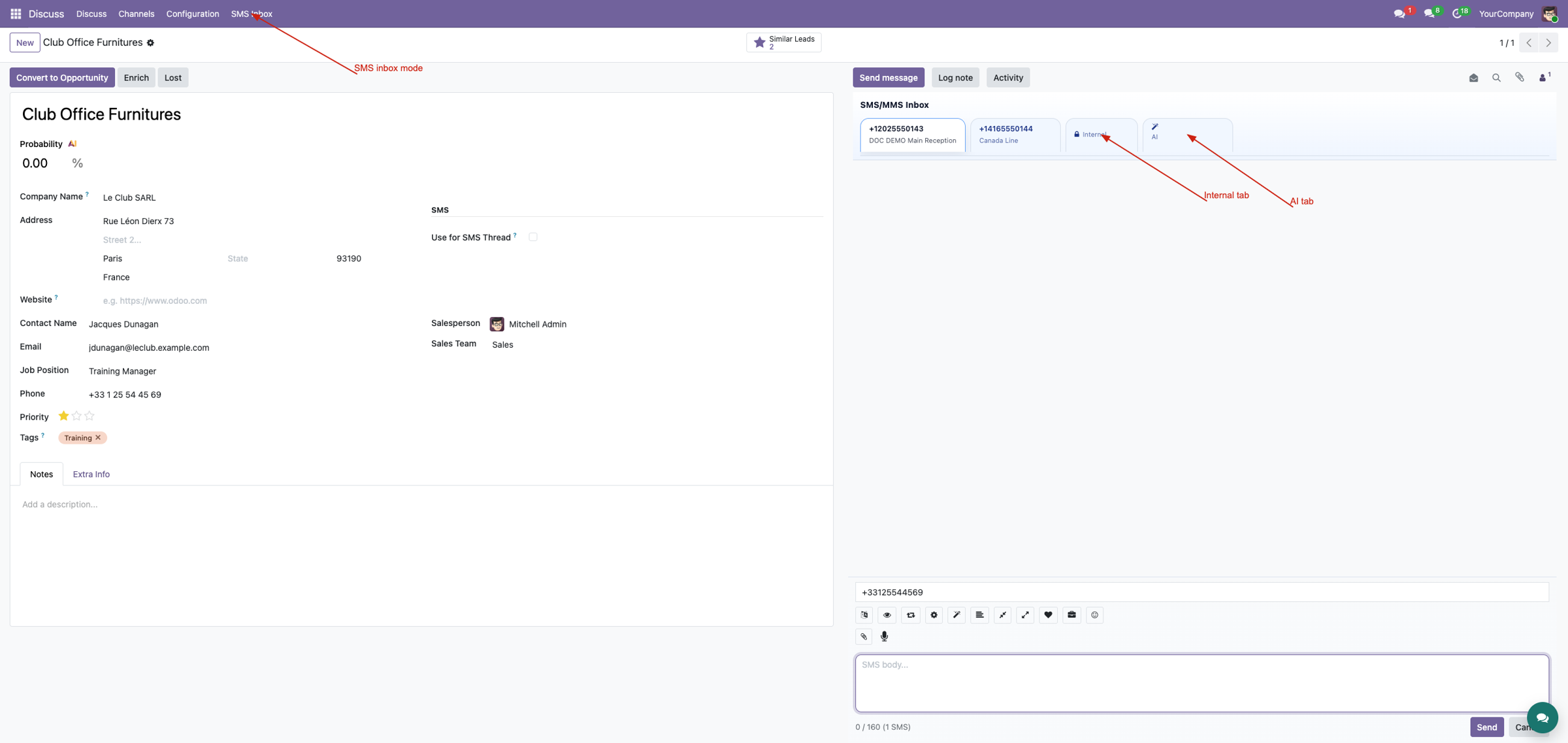
Keep each number in its own lane
Accessible gateway numbers become tabs and lock the sticky composer to the selected identity. Internal and AI tabs sit alongside them, while overflow scrolling keeps larger number sets usable.
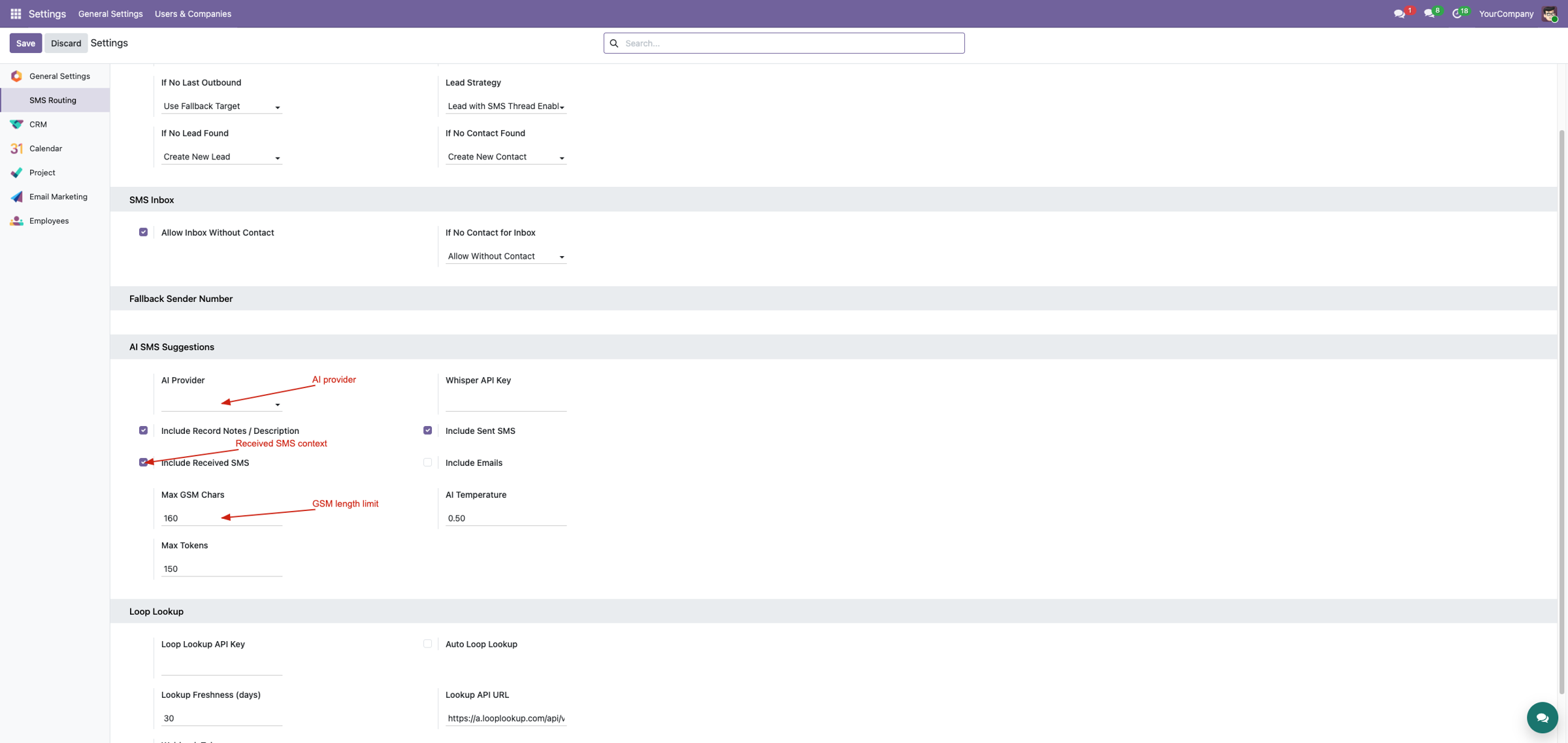
Configure AI context deliberately
Choose ChatGPT or Gemini, configure its key/model, define whether record notes and sent/received SMS may be included, then control GSM reply length, temperature and token budget. External AI processing is optional and must follow your privacy policy.
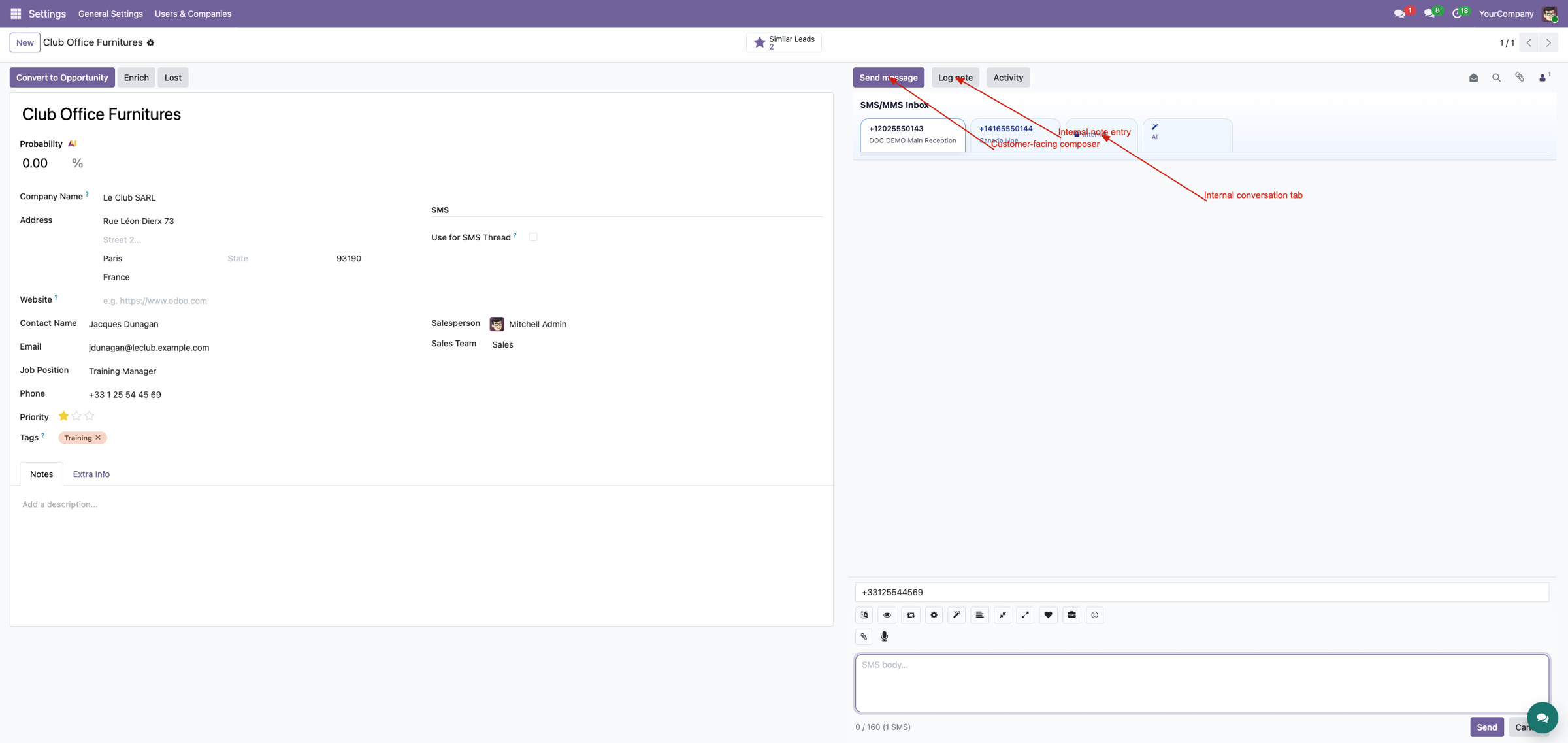
Collaborate privately beside the customer thread
Internal notes are stored as a distinct internal message type. Mention suggestions focus on active record followers, and operators decide whether those notes may be included when generating an AI summary.
Correct routing without losing context
An inbound message action searches readable, partner-compatible leads, orders, invoices, tasks and other installed documents. Backend checks prevent rerouting outbound or canonical inbox copies and refresh both old and new chatter after the move.
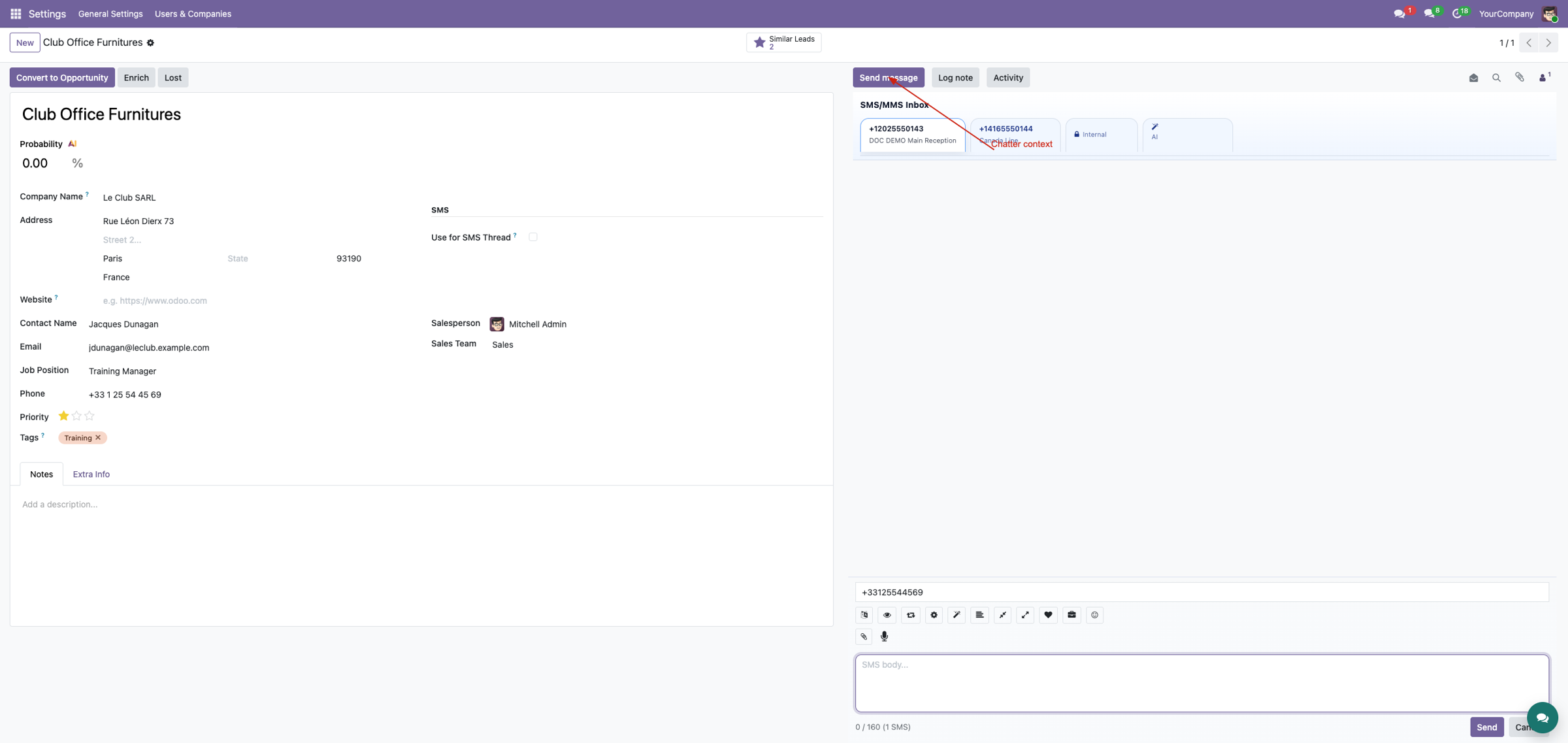
AI outputs remain under operator control
Generate main, all-number and per-number summaries, next steps, a suggested SMS and alternatives. Copy a choice into the correct number composer, edit it, verify message length and recipient, then send. AI can be incomplete or inaccurate and never replaces user review.
Complete suite demo
See structured chatter in the broader gateway, inbound, MMS and floating workflow.
Watch on YouTubeRequirements and limitations
This module requires the transport, inbound, MMS and workspace layers below it. AI requires customer-owned third-party credentials and network access. Translation and transcription controls require their companion routes. Review external-service privacy and generated content before production use.
Professional Services
Implementation
AI/privacy setup
Customization
Training & support
Corvus Nexus Technologies LTD
https://corvusnexus.co.uk support@corvusnexus.co.uk +44 740 4228172
Corvus module ladder
Build the complete Corvus SMS experience
SMS Chatter Conversations provides one focused layer. Choose the complete Corvus SMS Suite when the deployment also needs configurable gateways, inbound routing, MMS, workspace tools, structured chatter, floating conversations, real-time notifications, translation, enrichment, and campaigns.
SMS Inbox & Composer
Choose the correct business number, understand SMS length, attach MMS media or voice, work Inbox threads, clean active chatter without erasing evidence, and keep open records synchronized.
View on Odoo AppsSMS Language Translation
Set user preferences, detect the sender language, translate inbound context and outbound drafts, and keep translation controls inside the Inbox and composer used by the team.
View on Odoo AppsSMS & MMS Messaging Suite
Combine gateway transport, inbound routing, MMS, operator workspaces, structured chatter, floating messaging, real-time notifications, AI tools, and optional translation, enrichment, and campaign workflows.
View on Odoo AppsView the complete suite
Shared suite demonstration
See the complete SMS/MMS workflow
This video demonstrates the broader Corvus suite, not only SMS Chatter Conversations. It helps buyers understand how gateway setup, inbound routing, operator surfaces, messaging enhancements, and follow-up work fit together.
Open on YouTubeVersion and compatibility
Release history
| Version | Compatibility | Status |
|---|---|---|
| 19.0.1.0.0 | Odoo 19.0 | Current documented release |
| Documentation revision | 2026-07-24 | Hero, feature coverage, suite links, video, and FAQ refreshed |
Only verified release information is listed. Technical version semantics remain controlled by the module manifest.
Important questions
Frequently asked questions
Does SMS mode replace normal chatter?
No. The operator can return with Back to Chatter whenever standard notes, email, or activities are needed.
Are Internal-tab notes sent to the customer?
No. They are stored as private internal messages and remain separate from outbound SMS/MMS.
When do AI buttons appear?
Only when a supported provider and required API key are configured. Operators remain responsible for reviewing every result.
Can an inbound message be moved to any record?
Rerouting is constrained to valid related customer documents to reduce accidental cross-customer movement.
Implementation, integration, and support
Gateway and webhook configuration · Odoo SMS/MMS implementation · custom provider integration · migration · DevOps · training · troubleshooting · maintenance
corvusnexus.co.uk support@corvusnexus.co.uk
+44 740 4228172
Corvus Nexus Technologies LTD is not an official partner, reseller, or representative of any SMS/MMS provider. Provider accounts, network service, credentials, fees, sender registration, consent, and legal compliance remain the customer's responsibility. Custom gateways may require adjustment.
License and Usage Notice
These modules are provided with absolutely no warranty, commitment, or guarantee.
- Do not use in production until fully validated in test environment.
- Licensed only for one production database unless separate licensing applies.
- We are not responsible for data loss, downtime, outages, integration impact, or business impact.
- Do not redistribute, modify, reuse, or integrate code/concepts commercially without written permission.