Odoo 17.0 · 17.0.1.0.0
Licence: Other proprietary · Revision: b87e8fef26a2

MMS Media & Attachments
Add provider-independent MMS requests, secure expiring attachment URLs, composer media, and inbound attachment context to the Corvus two-way messaging stack.
What changes after installation
Everything needed for media-aware messaging
MMS capability control
Enable MMS only on gateways and sender numbers that actually support media.
Provider-ready requests
Configure endpoint, HTTP method, request type, body template, subject, and media placeholders.
Secure media delivery
Expose random-token attachment URLs for a controlled lifetime instead of permanent public files.
Familiar composition
Add a subject and attachments from the standard Odoo SMS composer.
Inbound media capture
Normalize one or many provider media URLs and retain them with the message.
Conversation evidence
Keep MMS type, media state, gateway context, and expiry records available for follow-up.
MMS Media & Attachments · Media layer
Carry images, audio and documents through your Odoo messaging workflow
Add provider-independent MMS endpoints, expiring public media links, composer attachments and MMS-aware inbound/outbound records to the Corvus two-way SMS foundation.
Composer media Expiring URLs Inbound + outbound
SMS text is not always enough
Provider APIs often require public media URLs rather than raw Odoo attachments. Incoming MMS can contain multiple remote URLs, and operators need the message to remain visibly different from plain SMS.
Provider-ready links
Generate tokenized URLs with gateway-specific base address and expiry.
Preserved media context
Link MMS state and media to SMS, chatter and notification records.
What the module adds
Media records
Attachment, token, URL, expiry, gateway and expiration state in one model.
MMS gateway profile
Endpoint, method, request type, body template, URL lifetime and public base URL.
Familiar composer
Optional subject and attachments in Odoo's existing SMS popup.
Inbound enrichment
Normalize provider media values and preserve them as URL attachments.
Clear semantics
Distinguish MMS and inbound MMS across notifications and chatter metadata.
Controlled exposure
Use random tokens and expiry rather than permanent anonymous file links.
1. Enable the correct gateway
Turn on MMS Enabled only for a provider and number that support media. The gateway list also exposes MMS availability and the preferred composer gateway.
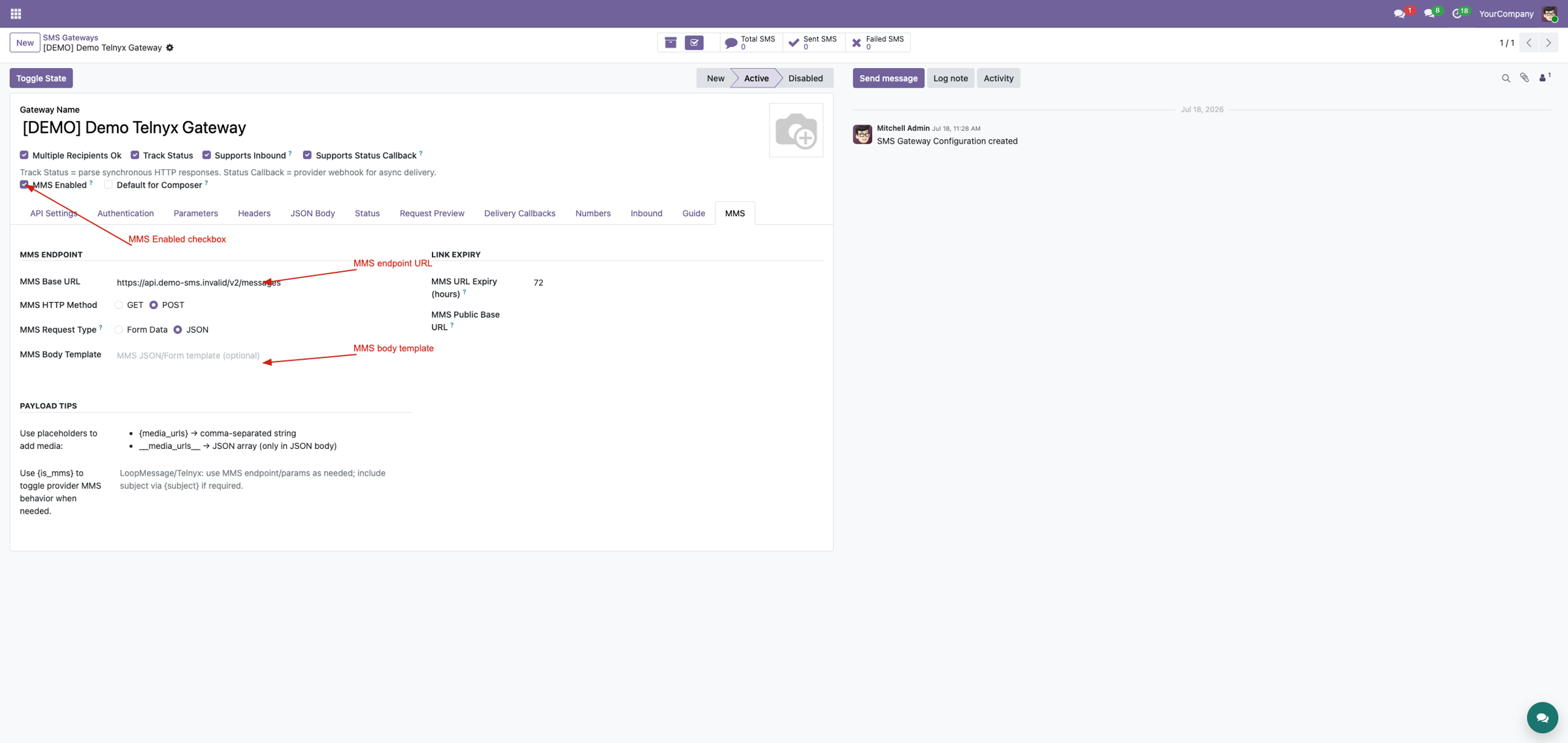
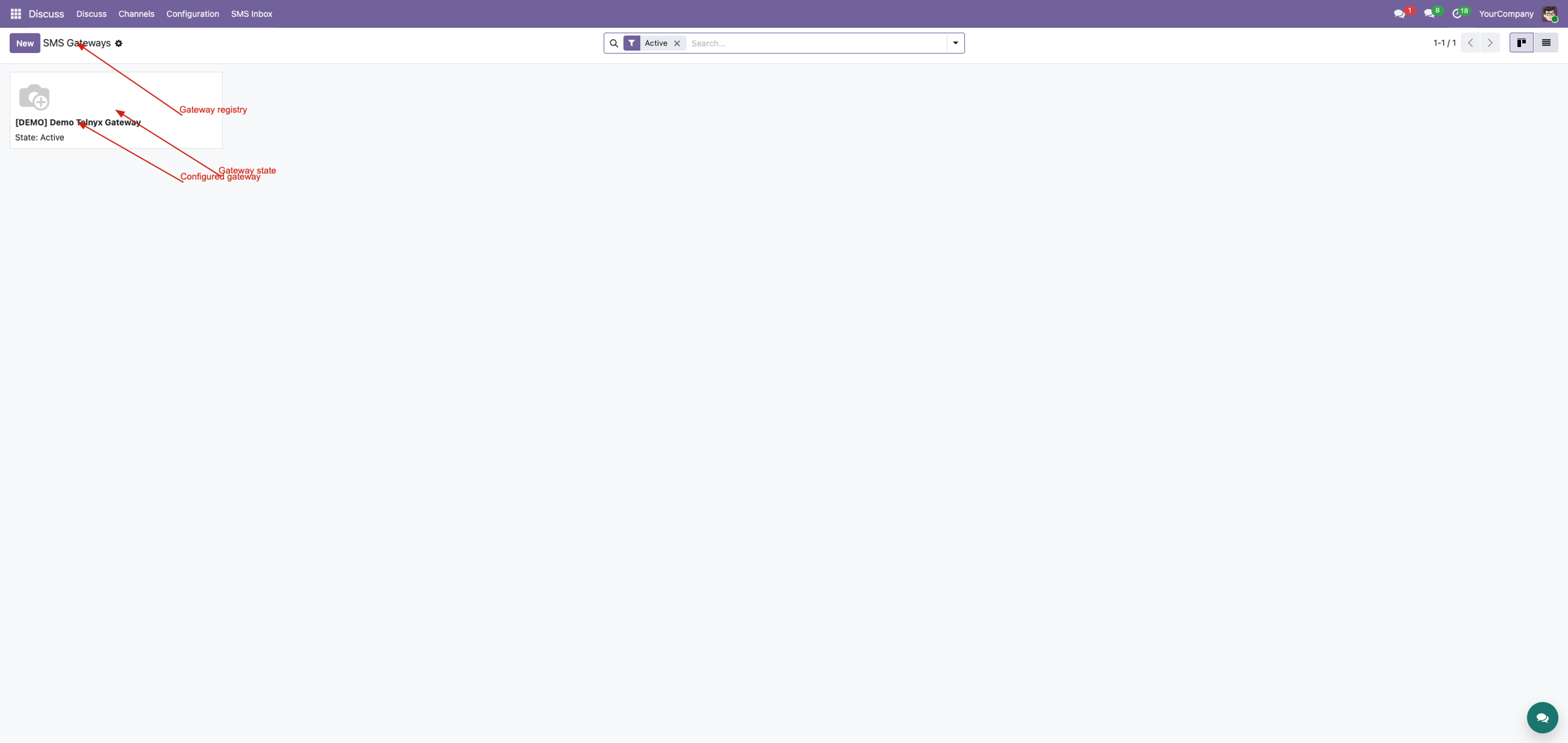
Compare capability before opening a record
The gateway list identifies which integrations are MMS-enabled and which gateway is preferred by the composer. Remove the default Active filter when evaluating all available templates.
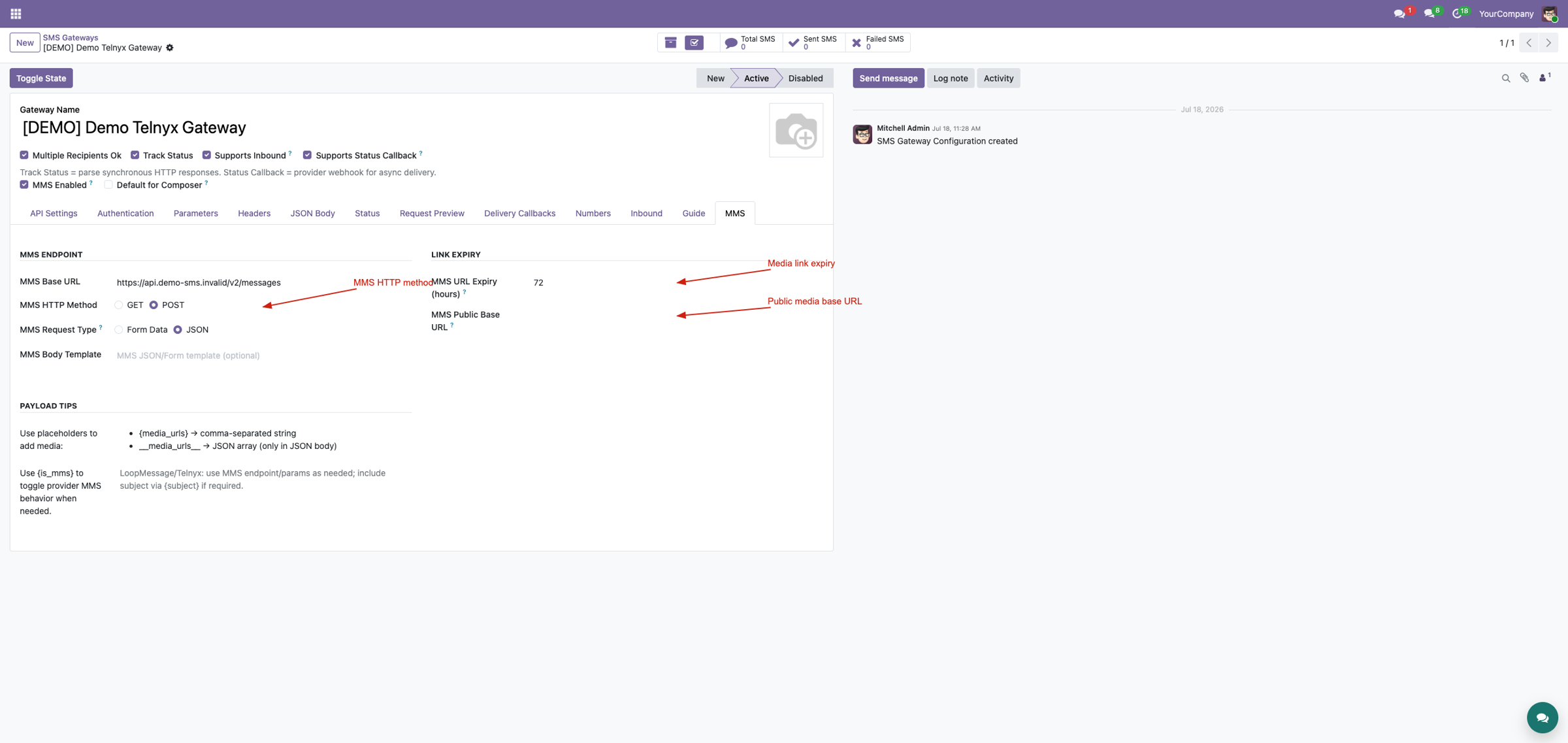
2. Build the media request
Configure the provider endpoint, HTTP method, request type and body template. Use
{media_urls}
for string payloads or
__media_urls__
for a JSON array, plus
{subject}
and
{is_mms}
where required.
Choose an expiry long enough for provider retries and a public HTTPS base URL reachable from the provider network.
3. Compose without leaving Odoo
Select an MMS-capable sender number, write the message, add an optional subject and attach media. The backend checks sender access and prevents attachments from being treated as sent through a non-MMS gateway.
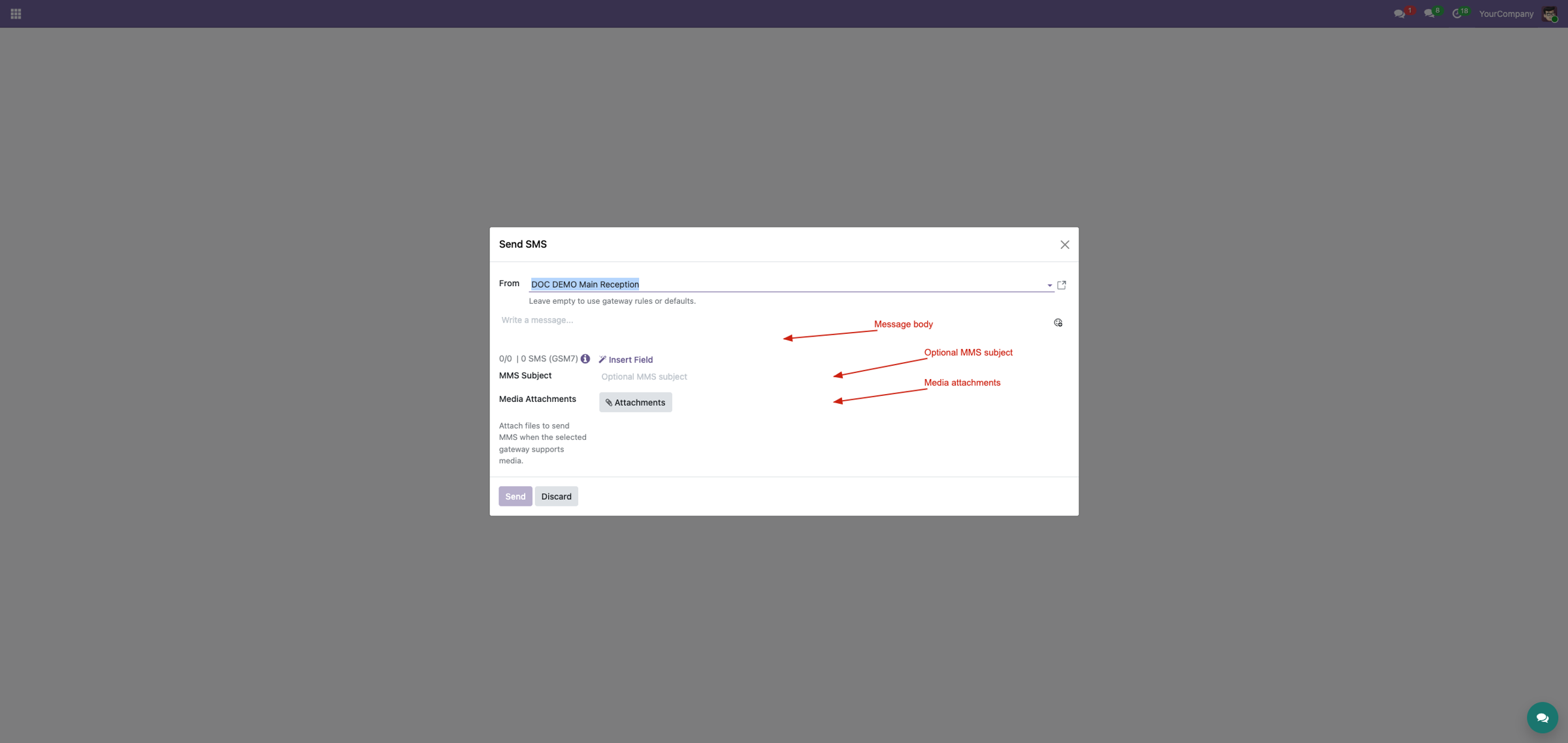
4. Keep media attached to the conversation
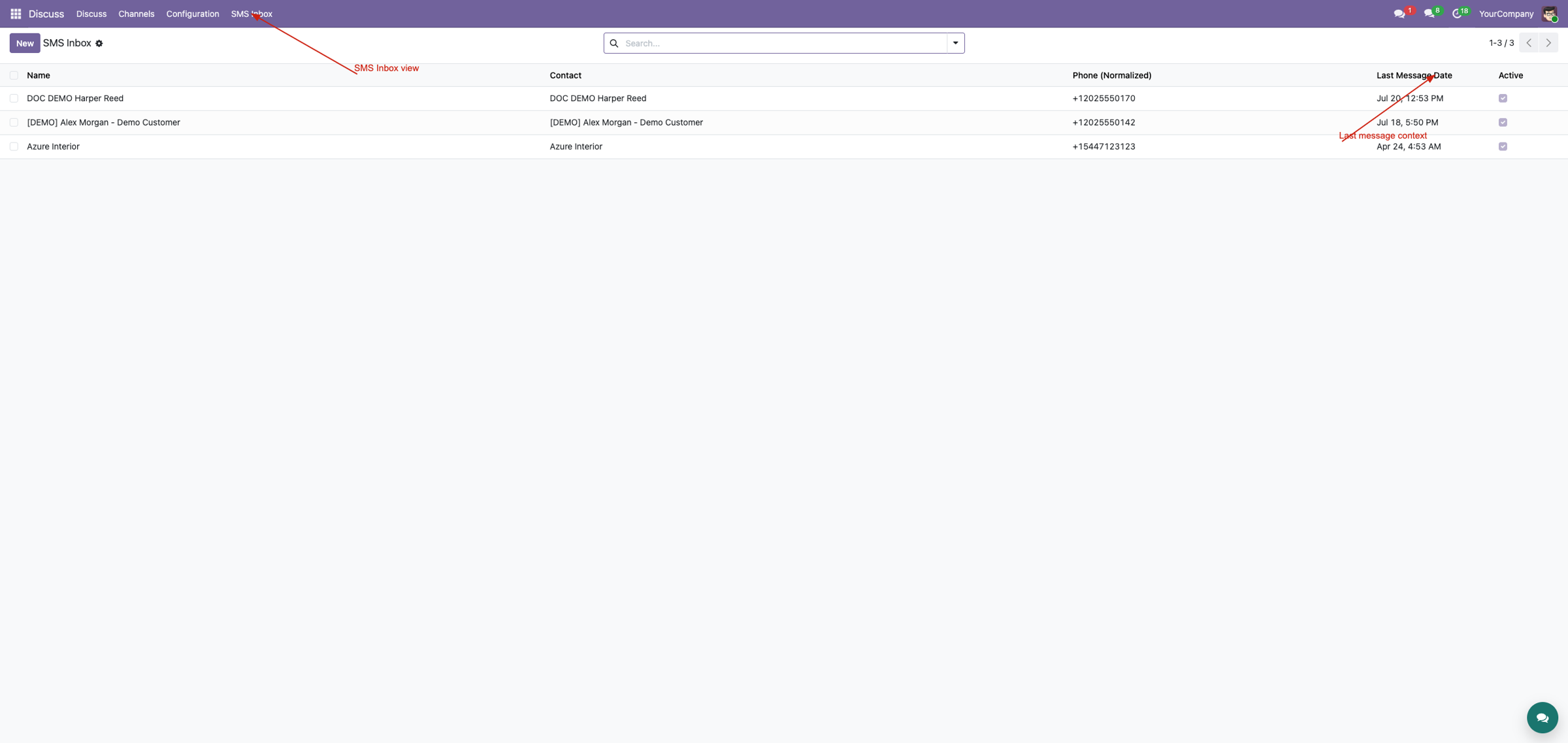
Outbound attachments and incoming provider media URLs are associated with the related SMS and chatter message. Notifications identify media-bearing messages as MMS, allowing richer suite interfaces to render the right context.
External requirements and limits
Your provider must support MMS, your number must be MMS-enabled, and generated URLs must be reachable through public HTTPS. File size, media type, recipient-country support and provider retries remain provider-controlled. Incoming media is preserved as URL attachments rather than always downloaded as binary content.
Custom gateways are not guaranteed to work without adjustment. Telnyx and LoopMessage have been tested for SMS/MMS workflows; Corvus Nexus Technologies LTD is not an official partner or telecom provider.
Complete suite demo
See MMS in the wider gateway, inbox, chatter and notification workflow.
Watch on YouTubeProfessional Services
Implementation
Installation and rollout.
Provider setup
MMS payload and media URL configuration.
Customization
Integration, migration and DevOps.
Support
Training and troubleshooting.
Corvus Nexus Technologies LTD
https://corvusnexus.co.uk support@corvusnexus.co.uk +44 740 4228172
Corvus module ladder
Build the complete Corvus SMS experience
MMS Media & Attachments provides one focused layer. Choose the complete SMS & MMS Messaging Suite when the deployment also needs configurable gateways, inbound routing, MMS, workspace tools, structured chatter, floating conversations, real-time notifications, translation, enrichment, and campaigns.
Two-Way SMS & CRM Inbox
Map provider payloads, validate webhooks, register multiple receiving numbers, route replies to CRM or contacts, preserve unmatched conversations, and diagnose every callback from one inbound foundation.
View on Odoo AppsSMS Inbox & Composer
Choose the correct business number, understand SMS length, attach MMS media or voice, work Inbox threads, clean active chatter without erasing evidence, and keep open records synchronized.
View on Odoo AppsSMS & MMS Messaging Suite
Combine gateway transport, inbound routing, MMS, operator workspaces, structured chatter, floating messaging, real-time notifications, AI tools, and optional translation, enrichment, and campaign workflows.
View on Odoo AppsView the complete suite
Shared suite demonstration
See the complete SMS/MMS workflow
This video demonstrates the broader Corvus suite, not only MMS Media & Attachments. It helps buyers understand how gateway setup, inbound routing, operator surfaces, messaging enhancements, and follow-up work fit together.
Open on YouTubeVersion and compatibility
Release history
| Version | Compatibility | Status |
|---|---|---|
| 19.0.1.0.0 | Odoo 19.0 | Current documented release |
| Documentation revision | 2026-07-24 | Hero, feature coverage, suite links, video, and FAQ refreshed |
Only verified release information is listed. Technical version semantics remain controlled by the module manifest.
Important questions
Frequently asked questions
Does this module provide an MMS carrier service?
No. It prepares and records MMS through configured gateways; a provider account, credentials, supported number, and provider service are still required.
Can every SMS gateway send MMS?
No. MMS must be enabled only for a gateway and sender number whose provider supports the required media workflow.
Why do attachment URLs expire?
Providers need reachable URLs, but permanent anonymous attachment links are unsafe. The expiry balances provider retries with controlled exposure.
What happens to incoming media?
Provider media URLs are normalized and retained with MMS-aware message and chatter metadata for the operator.

Implementation, integration, and support
Gateway and webhook configuration · Odoo SMS/MMS implementation · custom provider integration · migration · DevOps · training · troubleshooting · maintenance
corvusnexus.co.uk support@corvusnexus.co.uk
+44 740 4228172
Corvus Nexus Technologies LTD is not an official partner, reseller, or representative of any SMS/MMS provider. Provider accounts, network service, credentials, fees, sender registration, consent, and legal compliance remain the customer's responsibility. Custom gateways may require adjustment.
License and Usage Notice
These modules are provided with absolutely no warranty, commitment, or guarantee.
- Do not use in production until fully validated in test environment.
- Licensed only for one production database unless separate licensing applies.
- We are not responsible for data loss, downtime, outages, integration impact, or business impact.
- Do not redistribute, modify, reuse, or integrate code/concepts commercially without written permission.