Odoo 16.0 · 16.0.1.0.1
Licence: OPL-1 · Revision: bb6d0d3174d7
SMS Gateway & API Routing | Odoo 16.0

SMS Gateway & API Routing
Revolutionize Your Odoo SMS Communication
Latest Version
What's New:
- Dynamic configuration of multiple SMS gateways.
- Integration with a wide range of external SMS providers and HTTP-based APIs.
- Customizable request formatting for GET and POST methods, supporting both JSON and form data.
- Multi-recipient support with dynamic placeholder replacement.
- Real-time tracking and logging of SMS delivery statuses.
- Seamless fallback to Odoo’s IAP service when no custom gateway is matched.
- Extensive keyword support for enhanced Odoo search visibility.
- Comprehensive configuration options for API authentication (API Key, Token, Basic Auth, and more).
Roadmap:
- Enhance module flexibility by adding template gateways for different service providers.
- Develop predefined templates for popular SMS API formats to simplify setup.
- Expand integration support with new SMS providers and improve authentication options.
- Refine the user interface based on user feedback to improve configuration ease.
- Introduce advanced reporting and analytics features for SMS campaigns.
to see version history, click here
Overview
Welcome to the SMS Gateway module for Odoo 17—an innovative, cost-effective solution designed to revolutionize how you send SMS messages within Odoo! This module seamlessly integrates with Odoo’s built-in SMS functionalities, empowering you to leverage custom SMS APIs instead of relying solely on Odoo’s default IAP (Internet Application Provider) service, which can be prohibitively expensive, especially for users outside the EU. Whether you’re a business owner looking to cut communication costs or a developer seeking a flexible SMS integration, this module offers a powerful, tailored approach to SMS delivery.
Cost-Effective Communication
At its core, the SMS Gateway module intercepts SMS messages originating from Odoo’s SMS system (typically sent via IAP) and redirects them through your chosen custom APIs—only when you want it to. This redirection is fully configurable, giving you the freedom to decide how and when to use external providers.
Imagine you’re running a business in India, where Odoo’s IAP charges 0.0320 credits which if the EUR rate is 90, will be ₹ 2.88 per SMS. With this module, you can integrate a local SMS provider offering messages at just ₹0.255 each or maybe even less. Simply configure a gateway, set the country prefix to +91, and any contact number starting with +91, 0091, or 91 will automatically use this affordable local API. Ta Da, Your savings start immediately!
But the cost-cutting doesn’t stop there. The module’s intelligent prefix-matching system lets you drill down even further. For example, in a country like Pakistan, SMS costs can vary significantly between mobile networks. If you have a local provider offering ultra-low rates for same-network messages (e.g., Mobilink to Mobilink), you can set a gateway with a network-specific prefix like +9230. When a contact’s number begins with +9230, the module routes the message through this gateway, ensuring it’s sent via the Mobilink network to another Mobilink recipient. This precision slashes costs even more, making bulk SMS campaigns or customer notifications incredibly economical.
Unparalleled Flexibility and Reliability
Flexibility is a cornerstone of this module. You’re not locked into a single provider or approach. Configure multiple gateways with different prefixes—say, one for +91 (India), another for +9230 (Pakistan Mobilink), and a third for +1202 (US)—and the module will intelligently select the right gateway based on the recipient’s number. If no prefix matches, you’re still covered. The module includes configuration settings (res.config.settings) that let you define a default custom gateway. If that fails or isn’t set, and you’ve enabled the IAP fallback option, it gracefully hands off the message to Odoo’s IAP service. This ensures no message goes undelivered, balancing cost savings with reliability.
Technical Powerhouse for API Integration
Technically, this module is a powerhouse for RESTful API integration. It
supports both
GET
and
POST
methods, with
POST
requests configurable as
either form data or JSON payloads. Need custom headers like
Authorization: Bearer {token}? It’s
got you covered. Want to define dynamic parameters tailored to your
API’s quirks? You can do that too. Whether your provider requires a
simple query string (e.g.,
?to={phone}&text={message}) or a
complex JSON body (e.g.,
{"recipients": "{phones}", "message": "{message}"}), this module adapts effortlessly. It even handles Unicode messages,
so you can send greetings in Arabic, Urdu, or any language your
customers understand.
Seamless Integration and Global Adaptability
In short, the SMS Gateway module transforms Odoo into a cost-efficient, globally adaptable SMS platform. It’s tightly integrated with Odoo’s SMS system, intercepting messages only when you choose, and redirecting them through custom gateways that align with your budget and region. From small businesses in emerging markets to enterprises with diverse customer bases, this module empowers you to communicate smarter, cheaper, and more effectively. Dive into this guide to unlock its full potential—whether you’re configuring a gateway via the intuitive UI or extending its capabilities as a developer! Best of all, integration is effortless. It works flawlessly with odoo current SMS module; just configure the gateway(s), and it automatically integrates with Odoo’s built-in SMS marketing, notification, and other features.
Screenshots
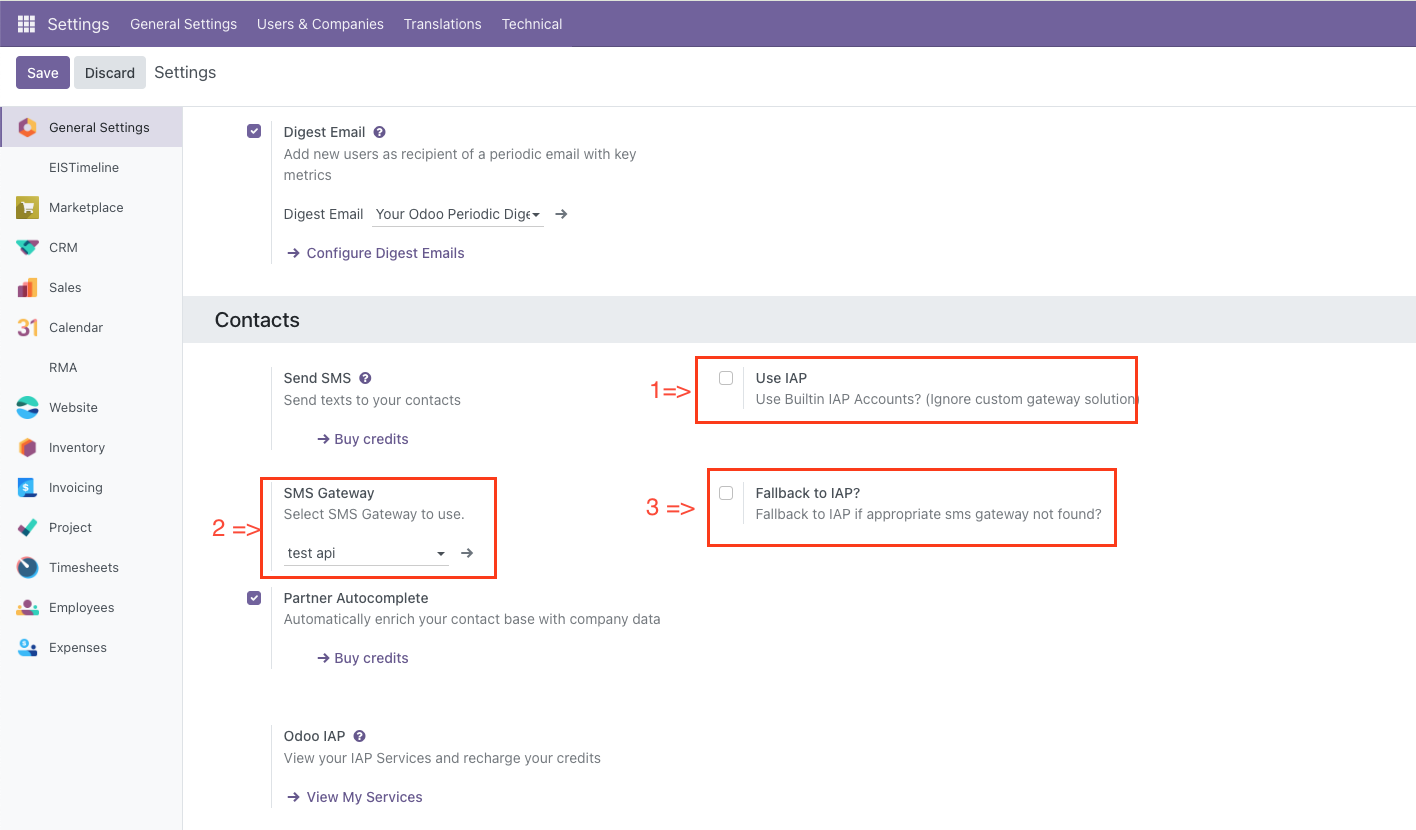
System Configuration Section
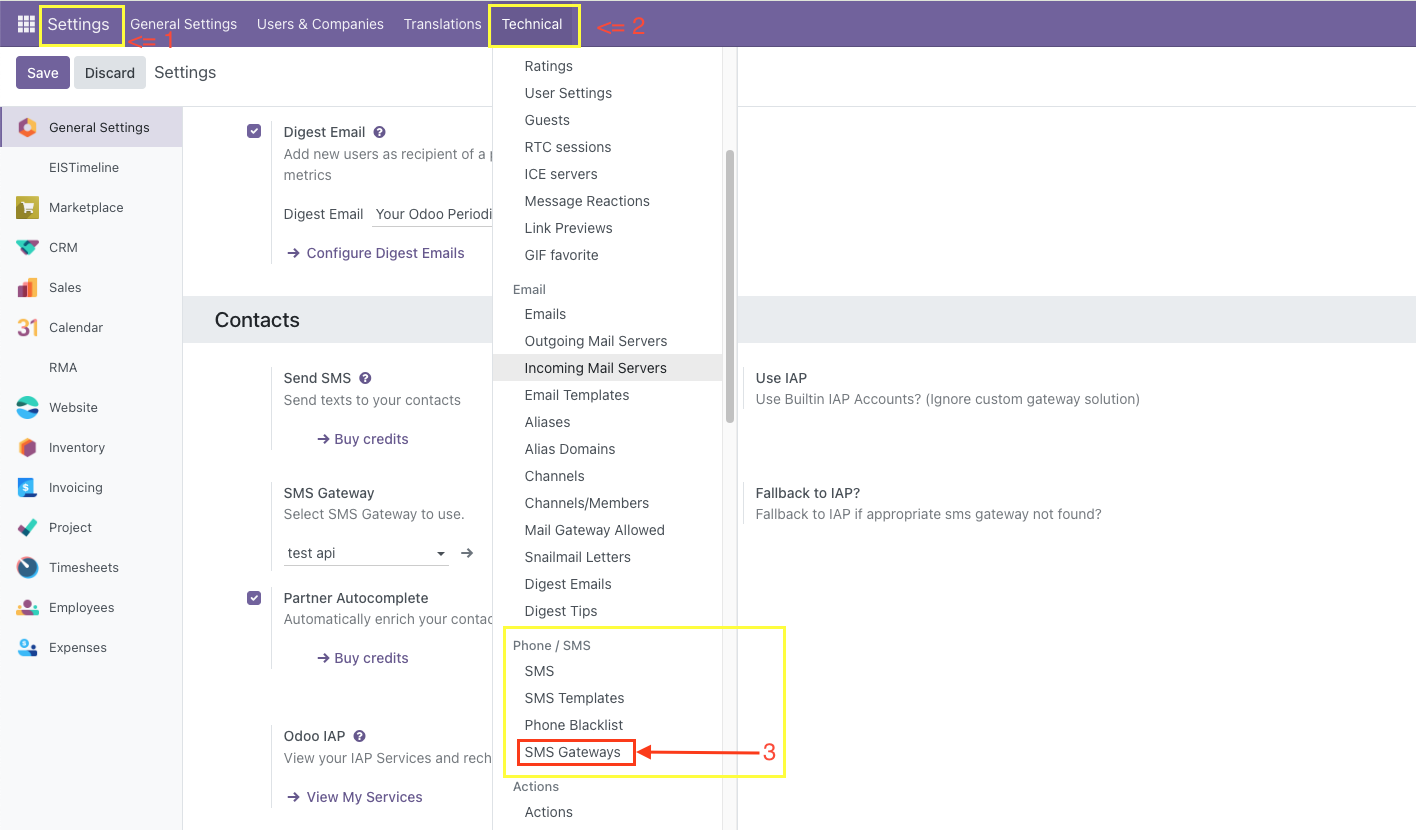
Gateway Menu
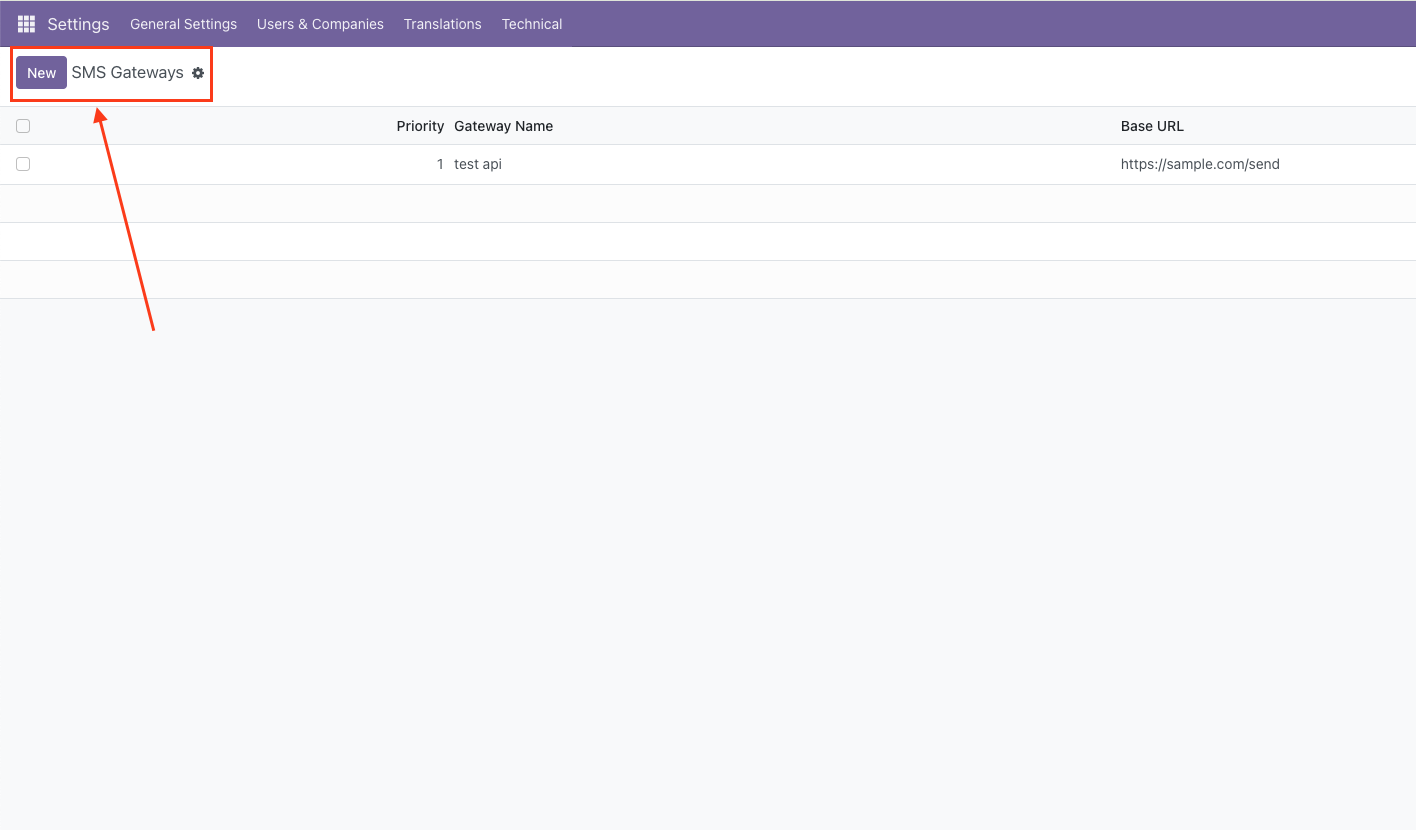
Gateway Tree View
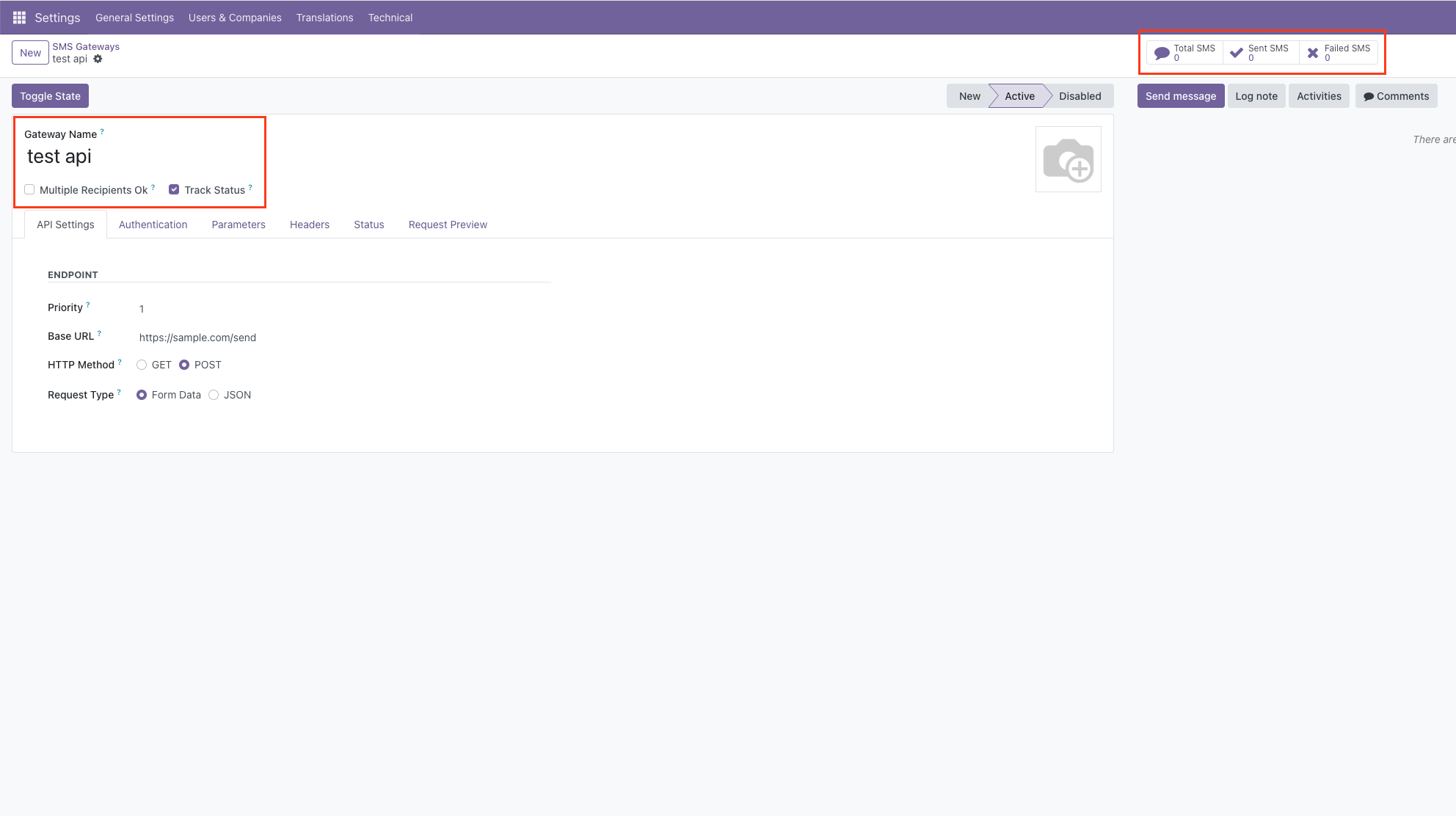
Gateway Form View
Dynamic SMS Gateway User Guide
Your Complete Guide to Sending SMS Messages with Odoo
Table of Contents
- 1. Introduction
- 2. Getting Started
- 3. Module Overview
- 4. Configuring Settings (res.config.settings)
- 5. Understanding SMS Gateways
- 6. How Gateways Are Selected for a Number
- 7. Using Gateway Templates
- 8. Creating a New Gateway
- 9. Parsing SMS Responses
- 10. Troubleshooting
- 11. Best Practices
1. Introduction
Welcome to the Dynamic SMS Gateway (eis_sms_apis) module for Odoo! This powerful tool lets you send SMS messages directly from Odoo using your favorite providers—like Twilio, SendPK, or MSG91—without needing to be a tech expert. Designed for non-developers, this guide walks you through every step, from setup to sending messages, ensuring you can communicate with customers worldwide affordably and efficiently.
Why Use This Module? Odoo’s default SMS service (called IAP) can be expensive, especially outside the EU. Our module connects to local or global SMS providers, often at lower rates, and gives you full control over how messages are sent. Whether you’re in India, KSA, or the UK, we’ve got you covered with pre-built templates and easy customization.
2. Getting Started
What You’ll Need
- Odoo: Version 17 or compatible, installed and running.
- Dynamic SMS Gateway Module: Installed by your Odoo admin (ask them if it’s not there).
- SMS Provider Account: Sign up with a provider (e.g., Twilio, Fast2SMS) and get your credentials (API key, token, etc.).
- Odoo Access: You need to be a system user to access it. Settings > Technical > SMS / Phone > SMS Gateways and Technical > System Parameters.
Installation
Your Odoo administrator will install the module via the Apps menu. Once done, you’ll see:
-
SMS Gateways:
Under Settings > Technical > SMS / Phone > SMS Gateways, listing pre-built
gateways.
You may need to activate Developers Tools - Settings Options: In Settings > General Settings , under "Contacts".
First Look: Open SMS Gateways to see templates like "Twilio (USA)" or "SendPK (Pakistan)". These are ready to customize!
3. Module Overview
The Dynamic SMS Gateway module replaces Odoo’s default SMS sending system with a flexible setup using SMS Gateways. Here’s how it works:
- Gateways: Bridges between Odoo and SMS providers (e.g., Twilio).
- Templates: Pre-built setups for 37 providers, ready to tweak.
- Settings: Control when to use gateways or Odoo’s IAP.
- Status Tracking: See if messages were sent successfully.
When you send an SMS (e.g., from a Contact), Odoo checks these settings and gateways to decide how to send it. Let’s dive into each part!
4. Configuring Settings (res.config.settings)
The SMS Configuration section in Settings > General Settings > Contact controls how Odoo sends SMS. These settings are stored in res.config.settings and decide whether to use gateways or Odoo’s IAP.
Settings and Their Roles
| Setting | What It Does | When It’s Used |
|---|---|---|
| Use IAP (sms.use_iap) | If checked ("True"), Odoo uses its default IAP service instead of gateways. |
|
| IAP Fallback (sms.iap_fallback) | If checked ("True"), Odoo falls back to IAP when no gateway matches a number. |
|
| Default Gateway (sms.sms_gateway_id) | Sets a fallback gateway if no prefix matches. |
|
How to Configure
- Go to Settings > General Settings.
- Scroll to Contacts.
- Use IAP: Check if you want Odoo’s default service; uncheck to use gateways.
- IAP Fallback: Check to ensure SMS still sends via IAP if gateways fail.
- Default Gateway: Select a gateway (e.g., "Twilio") from the dropdown.
- Click Save.
When IAP vs. Gateway Is Used
- IAP Used: If Use IAP is checked, all SMS go through Odoo’s service, bypassing gateways.
- Gateway Used: If Use IAP is unchecked, Odoo picks a gateway (see next section).
- Fallback: If no gateway matches and IAP Fallback is on, IAP kicks in.
6. How Gateways Are Selected for a Number
When you send an SMS, Odoo decides which gateway to use based on the phone number. Here’s the exact process:
Step-by-Step Selection Logic
- Check Settings: If Use IAP is checked, Odoo skips gateways and uses IAP.
-
Get Active Gateways:
- Odoo looks for gateways where:
- Field Active: Checkbox is ticked.
- State: Set to "Active" (not "New" or "Disabled").
- This gives a list of usable gateways.
- Odoo looks for gateways where:
-
Match Prefix:
- Odoo cleans the phone number (e.g., "+923001234567" becomes "923001234567").
- It checks each gateway’s Country Prefixes (e.g., "+92,+9230").
- If a prefix matches (e.g., "9230" matches "923001234567"), that gateway is a candidate.
-
Pick Lowest Sequence:
- If multiple gateways match, Odoo picks the one with the lowest Sequence number (e.g., 10 beats 20).
-
Default Gateway:
- If no prefix matches, Odoo uses the Default Gateway from settings (e.g., "Twilio").
-
First Active Gateway:
- If no prefix matches and no default is set, Odoo picks the first gateway from the active list (lowest sequence).
-
No Gateway:
- If no gateways are active or match, and IAP Fallback is on, IAP is used. Otherwise, the SMS fails.
Example
Phone number:
+923001234567
-
Gateways:
- "SendPK" (Active, State: Active, Prefix: "+92,+9230", Sequence: 10)
- "SMS Country PK" (Active, State: Active, Prefix: "+92", Sequence: 20)
- "Twilio" (Active, State: Active, No Prefix, Sequence: 30, Default Gateway)
-
Process:
- Both "SendPK" and "SMS Country PK" match "+9230".
- "SendPK" (Sequence: 10) wins over "SMS Country PK" (Sequence: 20).
- Result: "SendPK" sends the SMS.
7. Using Gateway Templates
We’ve included over 37 pre-built gateway templates for providers like Twilio, SendPK, and Fast2SMS. These are ready-to-use setups based on real documentation, but they need your personal touch.
Step-by-Step
-
Find Templates:
Go to Settings > Technical > SMS / Phone > SMS Gateways.
You need to enable developer mode. - Pick One: See names like "Twilio (USA)" or "Msegat (KSA)". Click one.
-
Update Credentials:
- Look for
demoin API Key, Token, Username, or Password. - Replace with your real details from the provider (e.g., Twilio’s Account SID and Auth Token).
- Look for
- Set Sender: In Parameters, find "From" or "sender" and replace "[Your Sender ID]" with your registered number or ID.
-
Activate:
- Tick Active.
- Click Toggle State until State is "Active".
- Save: Hit Save.
- Test: Send a test SMS from a Contact or the SMS Composer.
About Templates
- Source: Created from official provider documentation.
- Demo Data: Fields like API Key are set to "demo"—replace them!
- Not Tested: We haven’t tested these live; verify with the Gateway Documentation Link for updates.
8. Creating a New Gateway
Need a provider not in our templates? Create your own gateway with these steps.
Step-by-Step
- Start Fresh: Settings > Technical > SMS / Phone > SMS Gateways > Create.
-
Basic Info:
- Name: E.g., "My SMS Provider".
-
Base URL:
From provider docs (e.g.,
https://api.mysms.com/send). - Method: "GET" (simple URL) or "POST" (data sent in body).
- Request Type: "Form Data" (key-value pairs) or "JSON" (structured data).
-
Authentication:
- Type: "None", "API Key", "Token", "Basic Auth", or "Custom".
- API Key/Token: Enter your key/token.
- Basic Auth: Add Username and Password.
-
Parameters:
Add under Parameters:
- Key: E.g., "to", "message".
-
Value:
Use placeholders like
{phone},{message}. - Type: "Single Number", "Multiple Numbers", "Message", "Authentication", or "Other".
-
Headers:
Add under
Headers
if needed (e.g.,
Key: Authorization,Value: Bearer {token}). -
JSON Body:
For "POST" with "JSON", enter a template (e.g.,
{"to": "{phone}", "text":
                        "{message}"}
). -
Success Settings:
- Success HTTP Codes: E.g., "200,201".
- Success Substring: E.g., "success".
-
Message ID Regex:
E.g.,
"id":"([A-Za-z0-9]+)".
- Save and Activate: Save, tick Active, set State to "Active".
Field Roles
| Field | Role | Example |
|---|---|---|
| Parameters | Data sent to the provider (e.g., phone number, message). |
Key: to, Value: {phone}
|
| Headers | Extra info sent with the request (e.g., authentication). |
Key: Authorization, Value: Bearer {token}
|
| JSON Body | Structured data for "POST" with "JSON" (replaces parameters). |
{"to": "{phone}", "text": "{message}"}
|
HTTP Methods and Types
-
GET:
Simple request via URL (e.g.,
api.com/send?to={phone}). - POST: Sends data in the body, more secure.
-
Form Data:
Key-value pairs (e.g.,
to={phone}&message={message}). -
JSON:
Structured data (e.g.,
{"to": "{phone}"}).
Placeholders
Placeholders are special tags replaced when sending SMS:
{phone}: Single phone number (e.g., "+923001234567").{phones}: Multiple numbers (e.g., "+92300,+92301").{message}: The SMS text (e.g., "Hello!").{api_key},{token},{username},{password}: Your credentials.
How It Works:
Odoo swaps these with real values (e.g.,
{phone}
becomes "+92300…"). URLs, parameters, headers, and JSON bodies use these placeholders.
9. Parsing SMS Responses
After sending an SMS, the provider replies with a response (e.g., "success" or an error). Odoo uses these fields to understand it:
Key Fields
| Field | Purpose | Example |
|---|---|---|
| Track Status | If checked, logs responses in SMS Statuses. | Check to see results. |
| Success HTTP Codes | Codes meaning "success". |
200,201
|
| Success Substring | Text in the response showing success. | OK,
sid
|
| Message ID Regex | Pattern to extract a tracking ID. |
"id":"([A-Za-z0-9]+)"
|
How Responses Are Parsed
Example Response:
{"sid": "SM123", "status": "sent"}
- HTTP Code: If "201" is in Success HTTP Codes, it’s a success.
- Substring: If "sent" matches Success Substring, it’s a success.
-
Message ID:
"sid":"([A-Za-z0-9]+)"grabs "SM123". - Result: Marked "Success" in SMS Statuses.
Tips
- Enable Track Status to see raw responses.
- Test with a sample SMS to find the right codes and substrings.
- Use regex tools to build Message ID Regex.
10. Troubleshooting
-
SMS Not Sending:
- Is Use IAP checked? Uncheck it.
- Gateway not Active or "Active" state?
- Credentials still
demo? - Prefix mismatch?
- Wrong Status: Adjust Success HTTP Codes or Success Substring.
- No ID: Check Message ID Regex against the response.
11. Best Practices
- Set Sequence low for preferred providers.
- Use Country Prefixes for regional targeting.
- Test every gateway with a single SMS first.
- Update templates with current provider info.
- Enable IAP Fallback as a safety net.
Version History
latest version is the only version. Keep visit to see latest versions
Support

Send email to get support.
Send Messege on WhatsApp!